


Most standard hoverboards require between 2 to 4 hours to reach a full charge, depending on the model and battery capacity. Smaller models designed for children may charge in as little as 1.5 hours, while heavy-duty, off-road boards can take up to 5 hours. To prevent battery degradation, you should always unplug the charger as soon as the status light turns green.
Picture this: the sun is shining, the weather is perfect, and you are ready to slide out onto the pavement for a smooth ride on your self-balancing scooter. You grab your gear, step toward your board, and press the power button, only to hear a sad beep and see a flashing red light. Your battery is completely flat. We have all been there, and it is a major buzzkill.
If you just bought your first self-balancing board, your mind is probably racing with questions. Chief among them is: How Long Does It Take to Charge a Hoverboard? Getting to know your board’s power needs is the best way to avoid being stranded with a dead battery. It also helps keep you safe while handling these high-powered devices.
In this guide, we will break down the typical charging times for various hoverboard sizes. We will also explore the critical factors that affect your charging speed, explain how to read your indicator lights, and share easy safety tips to keep your battery in tip-top shape for years to come.
Key Takeaways
- Average Charging Time: Expect a standard hoverboard to take 2 to 4 hours to fully charge.
- Indicator Lights: A red light means the board is still charging, while a green light indicates it is fully charged and ready.
- Never Overcharge: Leaving your hoverboard plugged in overnight can degrade the battery and create safety hazards.
- Use Original Chargers: Always use the official charger that came with your board to avoid damaging the lithium-ion cells.
- Storage Best Practices: Store your hoverboard in a dry place with about a 50% charge if you plan to leave it unused for several weeks.
📑 Table of Contents
The Short Answer: Average Hoverboard Charging Times
Not all hoverboards are created equal. Just like smartphones or electric cars, different hoverboard models come with different battery sizes. When looking closely at how long does it take to charge a hoverboard, you will notice that wheel size and motor strength play a big role in your wait time.
Standard Hoverboards (6.5-inch to 8-inch wheels)
These are the most common hoverboards you see in neighborhoods and parks. They are built for flat pavement and casual riding. Because they have moderate motor power, they use standard lithium-ion batteries. Typically, these classic models take between 2 to 3 hours to charge from empty to 100%.
Heavy-Duty and Off-Road Hoverboards (8.5-inch to 10-inch wheels)
If you own an all-terrain hoverboard with thick, rugged tires, your board has a much larger battery. These beasts need extra power to climb hills, navigate grass, and roll over gravel. Because their batteries have a higher capacity, they take longer to charge. You should expect an off-road hoverboard to take anywhere from 3 to 5 hours to charge fully.
Kids’ Hoverboards
Hoverboards designed specifically for younger children are lighter and have smaller motors. They do not need massive batteries to carry light riders at safe, lower speeds. As a result, these models often charge very quickly. Many kids’ hoverboards can reach a full charge in just 1.5 to 2 hours.
Key Factors That Affect Your Charging Speed
Have you noticed that your board sometimes charges faster or slower than usual? Several real-world variables influence how quickly your battery fills up. Knowing these factors will help you manage your time and your expectations.
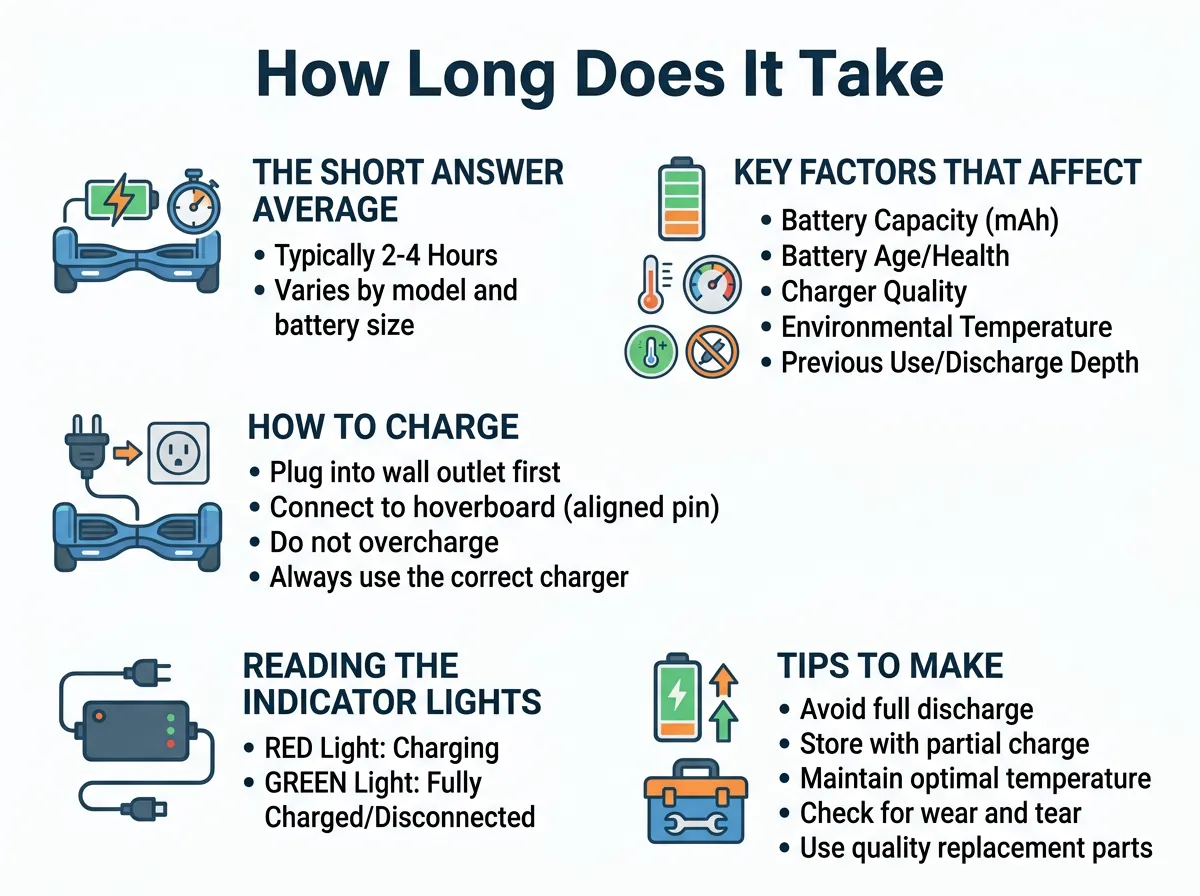
How Long Does It Take to Charge a Hoverboard? — key points at a glance
1. Battery Age and Overall Health
Lithium-ion batteries are fantastic, but they do degrade over time. When your hoverboard is brand new, the battery charges efficiently. However, after a year or two of regular use, the internal chemistry wears down. Older batteries may take longer to charge, or they might charge quickly but drain almost immediately during your ride.
2. The Quality of Your Charger
It can be tempting to buy a cheap replacement charger online if you lose your original one. However, this is a major mistake. Cheap chargers often do not deliver the steady voltage your battery needs. This can slow down your charge time significantly, or worse, ruin your battery. Always stick to original manufacturer parts.
3. Ambient Temperature
Batteries are sensitive to temperature. If you try to charge your hoverboard in a freezing cold garage or a scorching hot attic, the chemical process inside the battery slows down. In extreme temperatures, the battery might even refuse to charge as a safety precaution. Always charge your board in a temperature-controlled indoor room.
How to Charge a Hoverboard Safely and Correctly
Charging your hoverboard is not just about plugging it into the wall and walking away. To truly understand how long does it take to charge a hoverboard safely, we must look at the steps required to plug it in correctly. Following a safe routine prevents electrical shorts and extends the life of your machine.
Before you begin, make sure your hoverboard is turned off completely. Charging a board that is still powered on can confuse the battery management system and lead to uneven charging. Next, locate a flat, dry, and hard surface away from combustible materials like rugs, blankets, or paper.
We recommend checking out how to connect your charger properly to avoid sparks. The safest habit is to plug the charger into the wall outlet first. Ensure the LED light on the charger box glows green. Once you confirm the wall outlet is working, line up the three-pin charging port on your hoverboard and gently plug the cable in. The LED light on the charger should immediately turn red, showing that power is flowing into the battery.
For more specific safety steps, always refer to your brand’s basic manufacturer guidelines to ensure you do not void your warranty or damage your specific model during the process.
Reading the Indicator Lights: What Do They Mean?
You do not need to guess when your hoverboard is ready to ride. The charger itself acts as your guide. Almost every hoverboard charger on the market uses a simple color-coded light system to tell you what is happening.
The Red Light
When you first plug the charger into your empty hoverboard, the light on the charging brick will turn solid red. This is the “active charging” signal. It means the battery is successfully drawing power. Do not unplug the board while this light is red unless you absolutely have to go.
The Green Light
Once the battery reaches its full capacity, the light on the charger brick will switch from red to solid green. This indicates that the charging process is complete. You should unplug the charger from the wall and the board as soon as you see this green light.
A Flashing Red Light
If the light on your charger or the board itself is flashing red, this is an error warning. It usually means the battery is dangerously low, or there is a communication error between the charger and the battery cells. Unplug the charger immediately and let the board rest before trying again. If the flashing persists, your battery may need to be replaced.
Tips to Make Your Hoverboard Battery Last Longer
A high-quality hoverboard battery can last for several years if you treat it with respect. By adopting a few simple habits, you can keep your charge times fast and your rides long.
First, never leave your hoverboard plugged in overnight. It is easy to plug the board in before bed and forget about it. However, keeping the battery under constant electrical pressure after it hits 100% can cause it to overheat and degrade. Unplug it as soon as the light turns green.
Second, avoid letting your battery drain completely to 0% every time you ride. Lithium-ion batteries prefer shallow discharges. Try to plug your board in when the battery level drops to around 20%. Practicing proper hoverboard battery care and maintenance will save you from buying expensive replacement batteries down the road.
Finally, prepare your board for long-term storage. If you plan to put your hoverboard away for the winter, do not store it completely empty or completely full. Instead, charge it to about 50%, turn it off, and store it in a cool, dry place. Check the charge level once a month and top it up slightly to keep the battery healthy.
Conclusion
Knowing how long does it take to charge a hoverboard is the key to planning your outdoor adventures. For most riders, a simple 2 to 4-hour charge session is all it takes to get back on the move. By using the original charger, paying attention to the green and red indicator lights, and avoiding overnight charging, you can keep your board running safely and smoothly for a very long time. Keep your board charged, ride safe, and enjoy the glide!
Frequently Asked Questions
Can I leave my hoverboard charging overnight?
No, you should never leave your hoverboard charging overnight. Overcharging can overheat the lithium-ion battery, shorten its lifespan, and create a serious safety hazard. Always unplug the device once the charger light turns green.
Why is my hoverboard charger light green but the board won’t turn on?
If the charger light is green but your board is dead, your battery may be completely depleted beyond recovery, or there could be a loose internal wire. It can also mean your charger is broken and falsely reporting a full charge. You may need to test the outlet or consult a technician.
How long does a hoverboard battery last on a single charge?
On average, a fully charged hoverboard battery lasts between 45 minutes to 2 hours of continuous riding. This range depends heavily on the rider’s weight, the terrain, the speed, and the specific hoverboard model.
Can I use a different charger for my hoverboard?
It is highly recommended to only use the original charger that came in the box with your hoverboard. Using a third-party charger with incorrect voltage or current can permanently ruin your battery or cause a fire.
Should I charge my hoverboard after every use?
Yes, it is a great habit to charge your hoverboard after each ride once the board has cooled down for about 15 minutes. Keeping the battery topped up prevents it from dropping to a completely dead state, which is harmful to lithium-ion cells.
How do I know if my hoverboard battery needs to be replaced?
Your battery likely needs to be replaced if it takes less than an hour to charge but dies within minutes of riding. Other warning signs include the hoverboard cutting off suddenly while you are riding or refusing to charge at all.
