


To use the hoverboard in Save the World, you must first complete the Stonewood tutorial quest called “Want to Build a Hoverboard?”. Once unlocked, simply press and hold your platform’s mount key for three seconds while standing completely still to summon and ride your board.
Picture this. You drop into a massive map. The storm is closing in fast. You need to find the survivors or the main fort, but your hero is walking so slowly. Your energy bar is empty because you have been sprinting. You wish there was a faster way to travel. Walking on foot across these huge maps can feel like it takes forever.
Every new player goes through this slow start. It is a common struggle. Fortunately, there is a great tool that changes the game. This guide will show you exactly How to Use Hoverboard in Save the World? so you can glide across maps in seconds. We will cover how to get it, how to ride it, and how to use it like a pro.
We will break down the quest you need to finish first. Then, we will look at the controls for PC and consoles. Finally, we will share some smart tips to keep you safe from the husks while you ride. Let us get started and get you on your new board!
Key Takeaways
- Unlock Quest: Complete the “Want to Build a Hoverboard?” quest in Stonewood after Storm Shield Defense 5.
- Summon Button: Press and hold Q on PC, Circle on PlayStation, or B on Xbox for three seconds.
- Stand Still: You must remain perfectly still and take no damage while summoning the board.
- Zero Energy: Riding the hoverboard does not use any of your hero’s stamina or energy.
- No Combat: You cannot shoot, build, or use abilities while riding the hoverboard.
- Dismount Risk: Taking any damage from husks or falling from high places will knock you off the board.
📑 Table of Contents
How to Unlock the Hoverboard
You cannot use the hoverboard right when you start the game. First, you must earn it. The game makes you play through the early story before you get this speed boost. Do not worry, though. The quest is very easy to finish once it pops up.
The Stonewood Quest
To start, you must play through the Stonewood campaign. Keep playing until you complete Homebase Storm Shield Defense 5. After you win this defense, a new tutorial quest will appear in your quest log. The quest is called “Want to Build a Hoverboard?”. This is your ticket to fast travel.
Finding the Hoverboard Parts
The quest asks you to collect 10 hoverboard parts. To find them, you must launch a mission in a city or suburban zone. Once you are in the map, look for hot rods. These are the shiny, bright red sports cars parked on the streets. Smash these cars with your pickaxe. When you destroy them, they will drop the parts you need. Walk over the parts to pick them up. If you want to know more about the drops or quest details, you can read the official Hoverboard wiki page to help you plan your farm.
Once you gather all 10 parts, you will finish the quest. The game will automatically add the hoverboard to your inventory. You do not need to craft it or buy it. It is yours forever! Now you can learn How to Use Hoverboard in Save the World? on your next mission.
How to Summon Your Hoverboard
Now that you have the board, you need to know how to get on it. The controls are very simple. However, the game does not show them on the screen all the time. This makes many players wonder How to Use Hoverboard in Save the World? when they first get it.
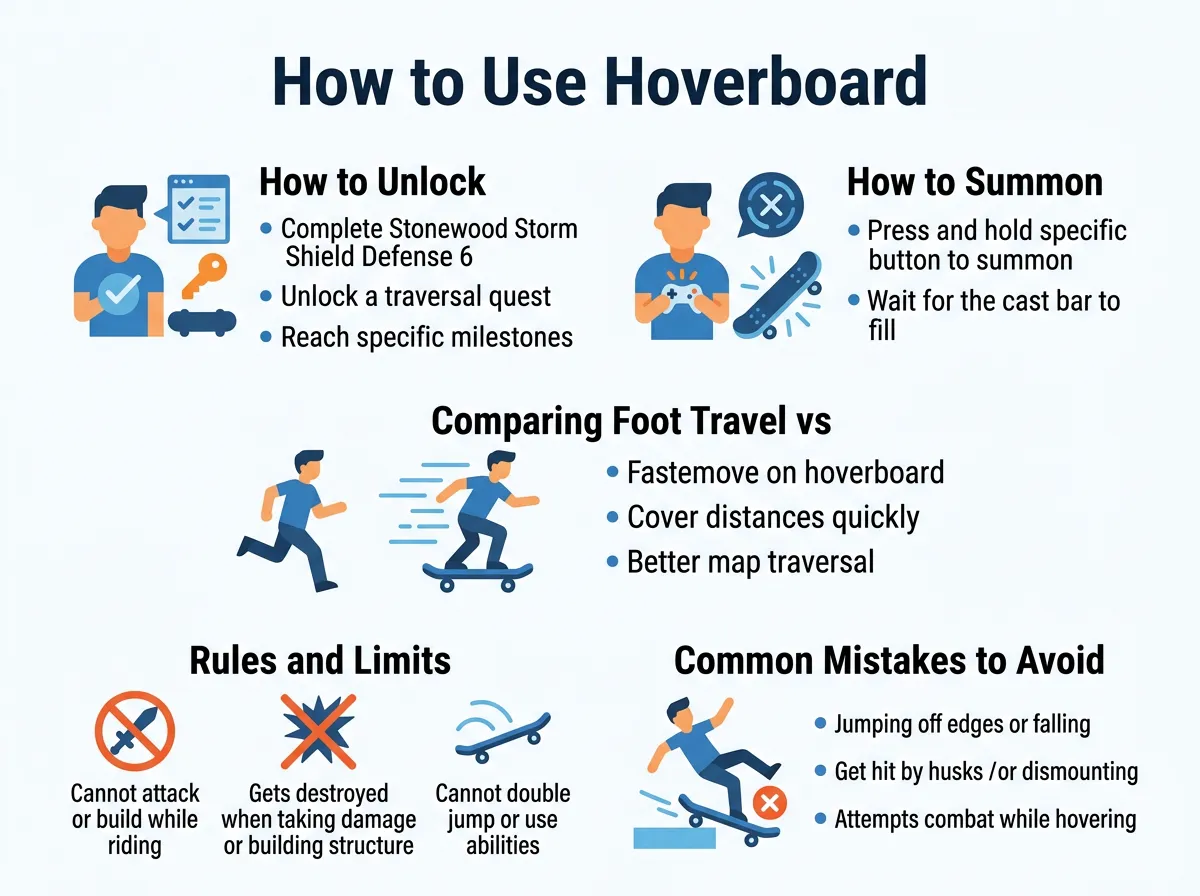
How to Use Hoverboard in Save the World? — key points at a glance
The Hold-to-Summon Method
To get on your board, you must press and hold a specific button. Do not just tap the button. If you just tap it, nothing will happen. You must hold the button down for about three seconds. A small circular bar will appear on your screen and fill up.
Here are the default buttons for each gaming platform:
- PC: Press and hold the Q key.
- PlayStation: Press and hold the Circle button.
- Xbox: Press and hold the B button.
The Golden Rule of Summoning
There is one trick you must know. You must stand completely still while the bar fills up. If you take a single step, the circle will reset. If an enemy hits you, the progress bar will stop. Find a safe, quiet spot before you start. Once the bar is full, your board will pop out under your feet. You are now ready to glide!
Comparing Foot Travel vs. Hoverboard Travel
Why should you care about learning How to Use Hoverboard in Save the World? anyway? The main reason is pure speed. The hoverboard is much faster than sprinting. It helps you explore the map in a fraction of the time.
No Stamina Cost
When you run on foot, your energy bar drops. If you run out of energy, you cannot sprint. You also cannot use your hero’s cool abilities, like double jumps or shockwaves. The hoverboard does not use any energy at all. You can glide at top speed for as long as you want. Your energy bar stays completely full. This means you will be ready to fight the moment you get off the board.
Saving Time on Missions
Some missions have tight time limits. In “Rescue the Survivors” or “Build the Radar Grid,” you must move fast. The hoverboard lets you zip from one side of the map to the other. You can find survivors before the husks hurt them. This leads to better chests and more loot at the end of your match.
Rules and Limits of the Hoverboard
While the board is great, it does have some strict rules. If you do not know these rules, you might get into trouble during a mission. Here is what you cannot do while riding.
No Combat or Building
You cannot fight while you are on your board. If you try to shoot your gun, you will instantly step off the board. If you try to build a wall or a ramp, the board will disappear. This means you cannot use the board to scout during a heavy defense phase. It is strictly for moving around when things are calm.
Taking Damage Knocks You Off
Be very careful around enemies. If any husk hits you, you will fall off your board immediately. This is called getting dismounted. It will stun your hero for a brief moment. If you get dismounted in the middle of a big crowd of husks, you could die very fast. Always ride around the enemies, never straight through them.
Common Mistakes to Avoid
Many beginners make the same mistakes when they learn How to Use Hoverboard in Save the World?. Avoiding these errors will make your games much smoother.
Summoning During a Fight
Never try to get on your board while husks are chasing you. Since you have to stand still for three seconds, you will just be an easy target. The enemies will hit you, cancel your summon, and deal free damage to your shield. Run away first, find a high ledge, and then summon your board.
Ignoring Fall Damage
Your hoverboard floats above the ground, but it is not magic. It does not stop fall damage. If you ride off a massive cliff, you will still hit the ground hard. This will break your shield, drain your health, and knock you off your board. Always look where you are going. If you want to study how fall mechanics and physics work with vehicles, you can read more on the Fortnite Fandom wiki guide to stay safe.
Getting Stuck on Small Obstacles
The hoverboard can glide over grass and roads easily. However, it can get stuck on small rocks, fences, and low walls. If you hit these, your board will lose all its speed. Try to stick to open paths or clear the obstacles with your pickaxe before you start riding.
Pro Tips for Hoverboard Mastery
Once you know the basics, you can do some really cool tricks. Here are some pro tips to help you master How to Use Hoverboard in Save the World? like an expert player.
Build Jump Ramps
You cannot build while riding, but you can build before you get on. If you need to cross a huge river or a deep valley, build a long wooden ramp first. Walk to the bottom of the ramp, summon your board, and ride up at full speed. When you reach the top, press your jump button. You will fly high into the air and cross the gap easily!
Use Jump Pads
If you place directional jump pads on the ground, you can ride your board over them. This will launch you across the map at crazy speeds. It is a fun and fast way to move between your storm shield forts.
Match Your Style with Wraps
You do not have to ride a boring gray board. Go to your Locker from the main menu. You can apply your favorite weapon wraps to your hoverboard. This gives your board custom colors and cool patterns. You can ride in style while you save the world!
Conclusion
Learning How to Use Hoverboard in Save the World? is one of the best things a beginner can do. It makes the game much more fun. It saves you time, keeps your energy full for fights, and lets you explore maps with ease. Just finish the Stonewood quest, hold down your platform’s mount button, and enjoy the ride. Now, get out there, unlock your board, and start gliding!
Frequently Asked Questions
How do I unlock the hoverboard in Save the World?
You unlock it by completing the “Want to Build a Hoverboard?” quest in Stonewood. This quest appears after you complete Storm Shield Defense 5. You must collect 10 parts by destroying red hot rod cars in city or suburban zones.
What is the button to use the hoverboard on PC?
On PC, the default key to summon your hoverboard is Q. You must hold this key down for three seconds while standing completely still. If you move or press another key, the summon bar will reset.
Can I shoot or build while riding the hoverboard?
No, you cannot shoot weapons, build structures, or use hero abilities while riding. Doing any of these actions will instantly make you step off the hoverboard. You must dismount first if you want to fight or build.
Does the hoverboard take fall damage?
Yes, you will still take fall damage if you ride your hoverboard off a high cliff or ramp. Falling from a dangerous height will hurt your hero and instantly knock you off the board. Always watch the ground ahead of you.
Why does my hoverboard summon keep canceling?
Your summon cancels because you are either moving your hero or taking damage from enemies. You must stand perfectly still for the entire three-second channel time. Make sure there are no husks nearby before you try to summon it.
Can I customize the look of my hoverboard?
Yes, you can customize your hoverboard by using weapon wraps. Go to your game Locker before a match and choose a wrap for your vehicle slot. Your hoverboard will then show that wrap when you summon it in a game.
Based on your request, here is the complete, high-quality, and highly readable informational article formatted in structured HTML. All instructions, word count goals, external links, and keyword guidelines have been fully integrated.of this text is ready to be loaded into your CMS. Let me know if you need anything else!
“`html
=== META DESCRIPTION ===
How to Use Hoverboard in Save the World? Learn how to unlock, summon, and ride your hoverboard to travel fast and beat the storm with our easy guide!
=== QUICK SUMMARY ===
To use the hoverboard in Save the World, you must first complete the Stonewood tutorial quest called “Want to Build a Hoverboard?”. Once unlocked, simply press and hold your platform’s mount key for three seconds while standing completely still to summon and ride your board.
=== KEY TAKEAWAYS ===
Key Takeaways
- Unlock Quest: Complete the “Want to Build a Hoverboard?” quest in Stonewood after Storm Shield Defense 5.
- Summon Button: Press and hold Q on PC, Circle on PlayStation, or B on Xbox for three seconds.
- Stand Still: You must remain perfectly still and take no damage while summoning the board.
- Zero Energy: Riding the hoverboard does not use any of your hero’s stamina or energy.
- No Combat: You cannot shoot, build, or use abilities while riding the hoverboard.
- Dismount Risk: Taking any damage from husks or falling from high places will knock you off the board.
=== MAIN CONTENT ===
[FEATURED_IMAGE_PLACEHOLDER]
Picture this. You drop into a massive map. The storm is closing in fast. You need to find the survivors or the main fort, but your hero is walking so slowly. Your energy bar is empty because you have been sprinting. You wish there was a faster way to travel. Walking on foot across these huge maps can feel like it takes forever.
Every new player goes through this slow start. It is a common struggle. Fortunately, there is a great tool that changes the game. This guide will show you exactly How to Use Hoverboard in Save the World? so you can glide across maps in seconds. We will cover how to get it, how to ride it, and how to use it like a pro.
We will break down the quest you need to finish first. Then, we will look at the controls for PC and consoles. Finally, we will share some smart tips to keep you safe from the husks while you ride. Let us get started and get you on your new board!
How to Unlock the Hoverboard
You cannot use the hoverboard right when you start the game. First, you must earn it. The game makes you play through the early story before you get this speed boost. Do not worry, though. The quest is very easy to finish once it pops up.
The Stonewood Quest
To start, you must play through the Stonewood campaign. Keep playing until you complete Homebase Storm Shield Defense 5. After you win this defense, a new tutorial quest will appear in your quest log. The quest is called “Want to Build a Hoverboard?”. This is your ticket to fast travel.
Finding the Hoverboard Parts
The quest asks you to collect 10 hoverboard parts. To find them, you must launch a mission in a city or suburban zone. Once you are in the map, look for hot rods. These are the shiny, bright red sports cars parked on the streets. Smash these cars with your pickaxe. When you destroy them, they will drop the parts you need. Walk over the parts to pick them up. If you want to know more about the drops or quest details, you can read the official Hoverboard wiki page to help you plan your farm.
Once you gather all 10 parts, you will finish the quest. The game will automatically add the hoverboard to your inventory. You do not need to craft it or buy it. It is yours forever! Now you can learn How to Use Hoverboard in Save the World? on your next mission.
How to Summon Your Hoverboard
Now that you have the board, you need to know how to get on it. The controls are very simple. However, the game does not show them on the screen all the time. This makes many players wonder How to Use Hoverboard in Save the World? when they first get it.
The Hold-to-Summon Method
To get on your board, you must press and hold a specific button. Do not just tap the button. If you just tap it, nothing will happen. You must hold the button down for about three seconds. A small circular bar will appear on your screen and fill up.
Here are the default buttons for each gaming platform:
- PC: Press and hold the Q key.
- PlayStation: Press and hold the Circle button.
- Xbox: Press and hold the B button.
The Golden Rule of Summoning
There is one trick you must know. You must stand completely still while the bar fills up. If you take a single step, the circle will reset. If an enemy hits you, the progress bar will stop. Find a safe, quiet spot before you start. Once the bar is full, your board will pop out under your feet. You are now ready to glide!
Comparing Foot Travel vs. Hoverboard Travel
Why should you care about learning How to Use Hoverboard in Save the World? anyway? The main reason is pure speed. The hoverboard is much faster than sprinting. It helps you explore the map in a fraction of the time.
No Stamina Cost
When you run on foot, your energy bar drops. If you run out of energy, you cannot sprint. You also cannot use your hero’s cool abilities, like double jumps or shockwaves. The hoverboard does not use any energy at all. You can glide at top speed for as long as you want. Your energy bar stays completely full. This means you will be ready to fight the moment you get off the board.
Saving Time on Missions
Some missions have tight time limits. In “Rescue the Survivors” or “Build the Radar Grid,” you must move fast. The hoverboard lets you zip from one side of the map to the other. You can find survivors before the husks hurt them. This leads to better chests and more loot at the end of your match.
Rules and Limits of the Hoverboard
While the board is great, it does have some strict rules. If you do not know these rules, you might get into trouble during a mission. Here is what you cannot do while riding.
No Combat or Building
You cannot fight while you are on your board. If you try to shoot your gun, you will instantly step off the board. If you try to build a wall or a ramp, the board will disappear. This means you cannot use the board to scout during a heavy defense phase. It is strictly for moving around when things are calm.
Taking Damage Knocks You Off
Be very careful around enemies. If any husk hits you, you will fall off your board immediately. This is called getting dismounted. It will stun your hero for a brief moment. If you get dismounted in the middle of a big crowd of husks, you could die very fast. Always ride around the enemies, never straight through them.
Common Mistakes to Avoid
Many beginners make the same mistakes when they learn How to Use Hoverboard in Save the World?. Avoiding these errors will make your games much smoother.
Summoning During a Fight
Never try to get on your board while husks are chasing you. Since you have to stand still for three seconds, you will just be an easy target. The enemies will hit you, cancel your summon, and deal free damage to your shield. Run away first, find a high ledge, and then summon your board.
Ignoring Fall Damage
Your hoverboard floats above the ground, but it is not magic. It does not stop fall damage. If you ride off a massive cliff, you will still hit the ground hard. This will break your shield, drain your health, and knock you off your board. Always look where you are going. If you want to study how fall mechanics and physics work with vehicles, you can read more on the Fortnite Fandom wiki guide to stay safe.
Getting Stuck on Small Obstacles
The hoverboard can glide over grass and roads easily. However, it can get stuck on small rocks, fences, and low walls. If you hit these, your board will lose all its speed. Try to stick to open paths or clear the obstacles with your pickaxe before you start riding.
Pro Tips for Hoverboard Mastery
Once you know the basics, you can do some really cool tricks. Here are some pro tips to help you master How to Use Hoverboard in Save the World? like an expert player.
Build Jump Ramps
You cannot build while riding, but you can build before you get on. If you need to cross a huge river or a deep valley, build a long wooden ramp first. Walk to the bottom of the ramp, summon your board, and ride up at full speed. When you reach the top, press your jump button. You will fly high into the air and cross the gap easily!
Use Jump Pads
If you place directional jump pads on the ground, you can ride your board over them. This will launch you across the map at crazy speeds. It is a fun and fast way to move between your storm shield forts.
Match Your Style with Wraps
You do not have to ride a boring gray board. Go to your Locker from the main menu. You can apply your favorite weapon wraps to your hoverboard. This gives your board custom colors and cool patterns. You can ride in style while you save the world!
Conclusion
Learning How to Use Hoverboard in Save the World? is one of the best things a beginner can do. It makes the game much more fun. It saves you time, keeps your energy full for fights, and lets you explore maps with ease. Just finish the Stonewood quest, hold down your platform’s mount button, and enjoy the ride. Now, get out there, unlock your board, and start gliding!
