


If your hoverboard is leaning to one side, its internal gyroscopes are likely out of alignment. You can easily fix this by placing the board on a flat surface, turning it off, and holding the power button for ten seconds until the lights flash. This simple calibration process resets the sensors and restores your hoverboard’s natural balance.
You step onto your hoverboard, ready to enjoy a fun ride down the street. You lean forward, expecting to glide smoothly. Instead, the board pulls hard to the left. You try to shift your weight to correct it, but it keeps drifting. It feels like you are riding on a steep slope, even though the pavement is perfectly flat. This can be very frustrating and can quickly ruin your day.
A drifting or leaning hoverboard is a very common issue, especially for beginners. The good news is that your board is probably not broken. It just needs a quick software reset to find its balance again. In this guide, we will show you exactly how to solve this problem quickly. You do not need any special tools or technical skills to get your board running straight and true again.
We will cover why this tilt happens, walk you through the easy step-by-step reset process, and share tips to keep your board balanced. Let us dive in and fix your hoverboard so you can get back to riding safely.
Key Takeaways
- Gyroscopes are the brain: These tiny sensors detect your balance, and they can easily lose their calibration after crashes or bumps.
- Flat ground is essential: Always perform the reset on a completely flat, level floor to ensure the board learns the correct balance point.
- The 10-second hold: Pressing and holding the power button is the universal way to trigger calibration on most hoverboard models.
- Watch the lights: Flashing LED lights and beeping sounds indicate that the system reset is in progress.
- Alternative app resets: Some modern Bluetooth-enabled hoverboards can be easily calibrated using their official smartphone apps.
- Hardware checks: If calibration fails multiple times, the issue might be a loose internal wire or a cracked outer shell.
📑 Table of Contents
Why Does Your Hoverboard Lean to One Side?
To fix the issue, it helps to understand why it happens in the first place. Your hoverboard relies on complex technology to keep you upright. Understanding these basics makes it much easier to troubleshoot future issues.
Understanding the Internal Gyroscopes
Inside your hoverboard, there are tiny, highly sensitive sensors called gyroscopes. There is one under each foot pedal. These sensors act like the human inner ear. They detect the angle of your feet and how your weight shifts. They then send signals to the motors, telling each wheel how fast to spin. When you lean forward, the gyroscopes tell the wheels to move forward. If one sensor thinks you are leaning when you are actually standing straight, that wheel will spin faster, causing the board to drift.
Common Triggers for Sensor Misalignment
These delicate sensors can easily get confused. If you ride over a large bump, the sudden jolt can knock the gyroscopes out of alignment. Crashing into a wall, dropping the board, or jumping off while it is moving are also major causes. Even riding with a low battery can cause voltage drops that confuse the system. When this happens, the board loses its sense of what “flat” actually means. It thinks a tilted position is the flat baseline, which makes the board pull to one side.
Step-by-Step Guide: How to Calibrate Your Hoverboard
Calibrating your hoverboard is just a fancy way of resetting its brain. It teaches the gyroscopes what a level surface feels like. Follow these simple steps to perform a manual reset at home.
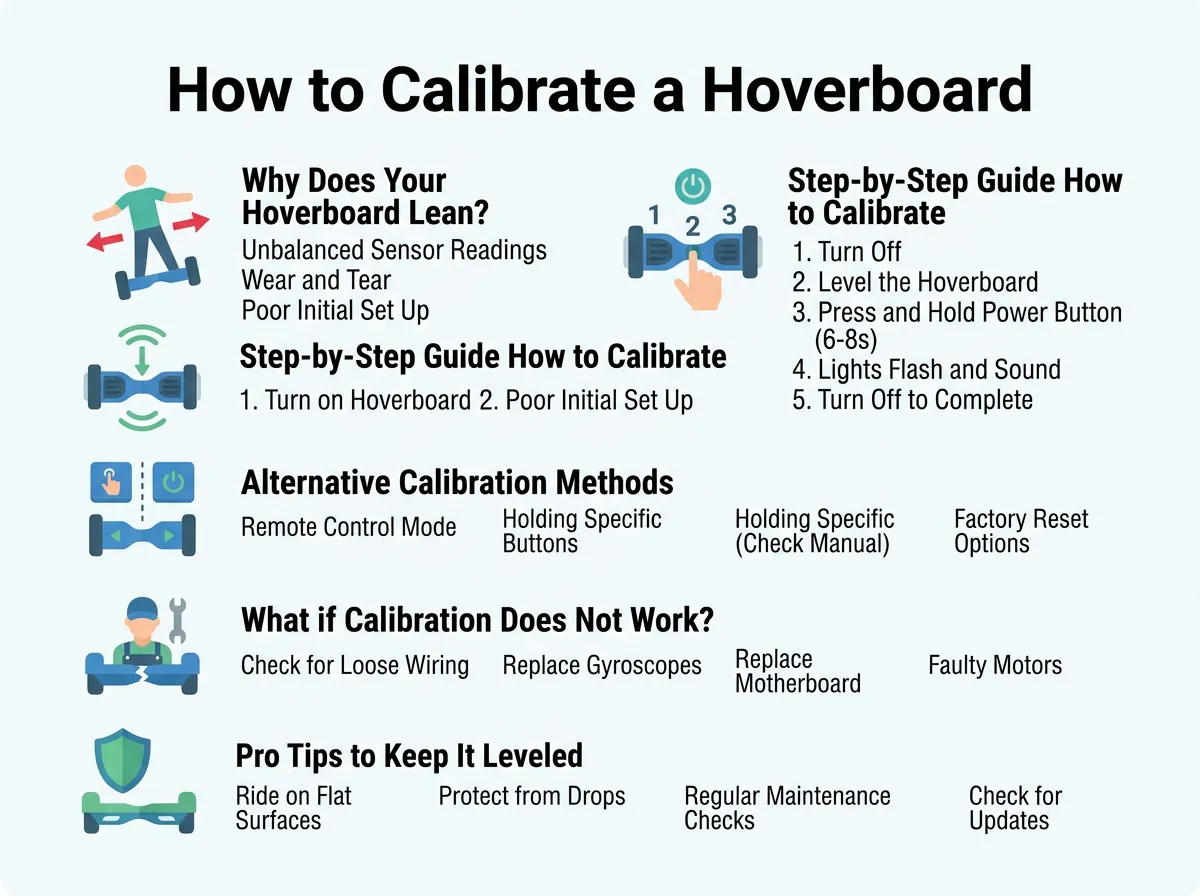
How to Calibrate a Hoverboard That Leans to One Side? — key points at a glance
Step 1: Turn Off the Hoverboard
First, make sure your hoverboard is turned off completely. Do not try to start this process while the board is turned on, in standby mode, or plugged into the charger. Working with a fully powered-down board ensures the reset starts clean.
Step 2: Find a Flat Surface
Place your hoverboard on a very flat, hard, and level surface. A hardwood floor, flat tile, or a level table works best. Avoid doing this on carpet or rugs. Carpet fibers can support one side of the board more than the other, which will ruin the calibration. You want the wheels to sit perfectly even on the ground.
Step 3: Align the Pedals Perfectly
Look at your hoverboard from the side. Make sure both foot pedals are completely level with each other and parallel to the ground. If your board has a joint in the middle, ensure the two halves are straight. If you have a small bubble level, you can place it on the pedals to be absolutely sure. If you need a visual guide for alignment, you can check this helpful Jetson hoverboard reset guide to see how to position your specific model.
Step 4: Press and Hold the Power Button
With the board flat and level, press the power button and hold it down. Do not let go. You will need to hold it down for about 10 seconds. After a few seconds, the LED lights on the board will start to flash. You will also hear a loud beep or a series of chirps. This means the board has entered its calibration mode. Keep holding the button until the flashing stops or stays steady, then release the button.
Step 5: Turn Off and Save
Now, turn the hoverboard off once more. This step is critical because it saves the new level settings into the board’s memory chip. If you step on the board immediately without turning it off first, it may not save the calibration, and you will have to start over.
Step 6: Turn On and Test
Turn the board back on normally. Step on it carefully and try riding on a flat area. It should now stay perfectly balanced under your feet without pulling to either side. If it still drifts slightly, you may need to repeat the process. Sometimes it takes two or three tries to get it perfectly level, especially if your floor is slightly uneven.
Alternative Calibration Methods for Different Brands
Not all hoverboards are built the same way. Some modern models use advanced features that offer different ways to reset the system.
Using a Mobile App
Many smart hoverboards come with Bluetooth and a dedicated mobile app. If your board has an app, you can often calibrate it with a single tap. Open the app on your phone, connect it to your hoverboard, and look for “Calibration,” “Reset,” or “Sensor Leveling” in the settings menu. Follow the on-screen prompts. The app will tell you when the board is level and complete the reset automatically.
Bluetooth Hoverboard Nuances
Some boards with built-in Bluetooth speakers will play a voice prompt or a short tune instead of a simple beep during a manual reset. If you hear a voice saying “calibration successful” or a similar phrase, wait for the sound to finish completely before letting go of the power button and turning the board off. If your board continues to act up, you can read more on how to recalibrate the gyroscopes on various brand models.
What if Calibration Does Not Fix the Lean?
If you have tried calibrating your board three or four times and it still leans to one side, you might be dealing with a hardware problem rather than a software issue.
Checking for Loose Internal Wires
Hoverboards endure a lot of vibrations. When you ride over bumps or jump off the board, the wires inside can slowly wiggle loose. If a wire connecting a gyroscope to the main motherboard is loose or partially unplugged, the board will receive incorrect balance data. To check this, you would need to unscrew the bottom plastic shell. Only do this if your warranty is already expired, as opening the case will void your warranty. Look for any loose plugs and gently push them back into their sockets.
Inspecting the Wheel Motors
Sometimes, the motor inside one of the wheels can wear out or suffer damage from water or dirt. If one motor is weaker than the other, it will spin slower, causing the board to veer to that side. You can check this by lifting the board off the ground and pressing the pedals with your hands. Both wheels should spin freely and at the same speed. If one wheel feels stiff, makes a grinding noise, or lags behind, the motor may need to be replaced. Physical damage to the outer plastic shell can also hold one pedal lower than the other. If you suspect physical damage is the root cause, you can learn how to troubleshoot vertical balance issues caused by structural wear.
Pro Tips to Keep Your Hoverboard Balanced Longer
Once you get your hoverboard running straight, you want to keep it that way. Here are some simple, practical tips to protect your sensors from getting knocked out of alignment again.
- Step off backwards: Always step off the back of the hoverboard when you want to stop. Stepping off the front can cause the board to spin out of control, which often leads to a hard crash against a curb.
- Avoid rough terrain: Keep your hoverboard on smooth pavement, asphalt, or concrete. Riding on thick grass, deep gravel, or heavily cracked sidewalks shakes the internal electronics too much.
- Do not jump on the pedals: When mounting the board, step on gently. Stomping or jumping onto the footpads puts a massive amount of sudden stress on the gyroscopes.
- Keep the battery charged: Avoid riding your hoverboard when the battery indicator is flashing red. Low voltage can cause the sensors to send erratic signals, leading to sudden tilt errors.
Conclusion
A hoverboard that leans to one side can be annoying and unsafe, but it is incredibly easy to fix. In most cases, a simple ten-second manual reset is all it takes to align the gyroscopes and restore your board’s balance. By finding a flat surface, leveling the pedals, and holding the power button, you can save yourself a trip to a repair shop.
Take care of your board by avoiding hard crashes and rough terrain, and you will not have to calibrate it very often. Now that your hoverboard is perfectly balanced, grab your helmet, step on, and enjoy a smooth, safe, and upright ride!
Frequently Asked Questions
Why is my hoverboard leaning to one side?
This usually happens because the internal gyroscopes have lost their calibration. Bumps, crashes, or sudden jumps can knock these sensitive sensors out of alignment, making the board think a tilted angle is actually flat.
How long does it take to calibrate a hoverboard?
The entire calibration process takes less than two minutes. It only requires you to place the board on flat ground, hold the power button for ten seconds, and then turn it off and on again to save the settings.
Can I calibrate my hoverboard on a carpet?
No, you should never calibrate your hoverboard on a carpet. Carpet fibers are uneven and can cause the board to tilt slightly during the reset, which will result in an inaccurate calibration.
What should I do if the lights keep flashing after calibration?
If the lights continue to flash, it means the calibration process did not save correctly. Turn the board off, make sure it is completely level, and repeat the calibration steps carefully, ensuring you turn the board off before trying to ride it.
Can a low battery cause a hoverboard to tilt?
Yes, a low battery can cause voltage drops that interfere with the internal sensors. If your battery is nearly empty, the gyroscopes may struggle to read your balance correctly, causing the board to lean or shake.
Do all hoverboard brands calibrate the same way?
Most hoverboards use the standard ten-second power button hold to calibrate. However, some modern Bluetooth-enabled models can also be calibrated directly through a official companion smartphone app.
