


If your hoverboard constantly needs calibration, it is likely due to failing sensors, a weak battery, or loose internal wires. Over time, rough rides on uneven ground can knock the gyroscopes out of alignment, causing persistent balancing issues. Understanding these root causes can help you fix the problem and enjoy a smooth, safe ride once again.
Picture this scenario. You step onto your hoverboard, ready for a fun ride. You expect a smooth glide down the sidewalk. Instead, the board shakes under your feet. It tilts too far to one side. You feel like you might fall off. You just reset the board yesterday, so you wonder why it feels broken again. It can be very frustrating when your board will not stay balanced. If you find yourself asking, “Why Does My Hoverboard Need Constant Calibration?” you are not alone. This is a very common issue for riders of all skill levels.
In this guide, we will explore the root causes of this annoying problem. We will look at how your board works under the plastic shell. We will explain what makes it lose its balance so often. Finally, we will show you how to fix it for good so you can ride with confidence again.
Key Takeaways
- Sensor Alignment: Bumpy roads and hard crashes shake the internal gyroscopes out of place, leading to frequent calibration issues.
- Battery Health: A weak or aging battery cannot supply steady power, which confuses the balancing sensors.
- Loose Wiring: Loose internal plugs and wires disrupt the signal between the motherboard and the wheels.
- Proper Resetting: Always calibrate your hoverboard on a perfectly flat surface, or the sensor reset will not work.
- Component Wear: Cheaply made hoverboards use lower-quality parts that wear out much faster and need constant care.
📑 Table of Contents
- Understanding How Your Hoverboard Stays Balanced
- Why Does My Hoverboard Need Constant Calibration?
- The Culprit Inside: Gyroscopes and Motherboards
- Battery Issues and Voltage Drops
- Step-by-Step Guide to a Deep Calibration Reset
- How to Prevent Calibration Loss
- When is it Time to Replace the Gyroscope Sensors?
- Conclusion
Understanding How Your Hoverboard Stays Balanced
To understand why your board fails, you must first know how it stays upright. A hoverboard is a smart piece of tech. It relies on a few key parts to read your body movements and keep you balanced.
The Role of Gyroscopes
Inside your hoverboard, there are tiny sensors called gyroscopes. There is usually one under each foot pad. These sensors detect your weight. They measure the angle of the board many times per second. When you lean forward, the gyroscopes tell the motor to spin the wheels forward. When you lean back, the wheels reverse. If these sensors are not level, the board will not know what “flat” feels like.
How Sensors Read Your Footsteps
When you step on the rubber pads, you press down on small switches inside. These switches send a quick signal to the main computer brain. This brain is called the motherboard. The motherboard and the gyroscopes must work in perfect harmony. If either part gets slow or confused, the ride becomes shaky. Everything needs to align just right for a safe ride.
Why Does My Hoverboard Need Constant Calibration?
If you constantly have to reset your board, something is wrong with this harmony. So, why does my hoverboard need constant calibration? The most common reason is rough riding. If you ride on bumpy roads, the vibrations shake the sensors. This makes them lose their zero point. The zero point is the flat level the board uses to stay still. When the board loses this point, it thinks flat is actually tilted.
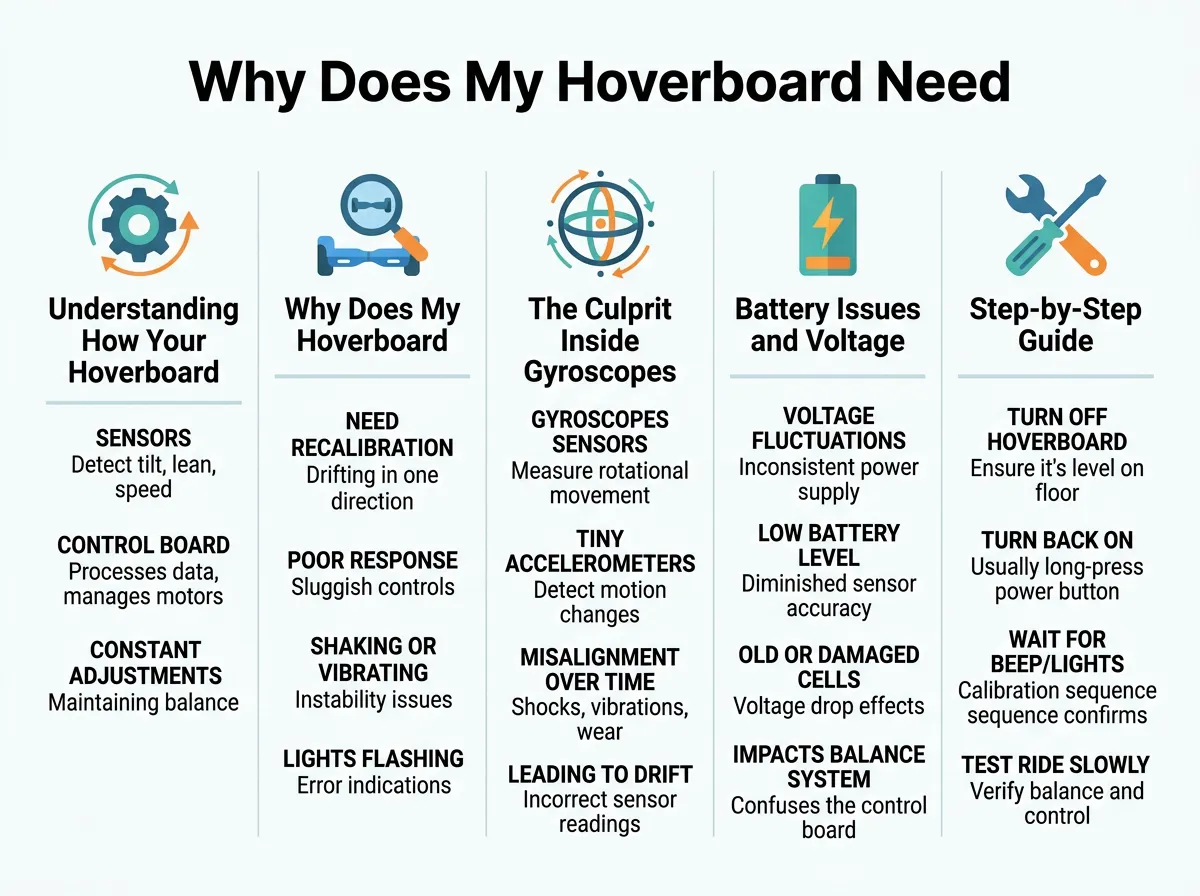
Why Does My Hoverboard Need Constant Calibration? — key points at a glance
Another big reason is a low battery. If the battery is weak, it cannot send steady power. The sensors need steady power to work. Without it, they get confused. Loose wires can also cause this. Inside your board, many tiny wires connect the parts. If a wire is loose, the connection drops. This forces you to reset the board again and again. If your board shakes or leans, learning how to calibrate a hoverboard properly is the first step to fix it.
The Culprit Inside: Gyroscopes and Motherboards
Let us look closer at the hardware. Hoverboards are tough, but they are not made of stone. The parts inside are delicate and can break over time.
Wear and Tear from Bumps and Drops
Every time you crash into a curb, the internal parts feel the shock. Every bump on the sidewalk sends a vibration through the frame. Over time, these shocks can damage the gyroscopes. The sensors can get physically stuck. This physical damage is a main reason why you might ask, “Why Does My Hoverboard Need Constant Calibration?” The physical parts keep shifting out of place, so the board forgets its balance.
Cheap or Damaged Components
Not all hoverboards are made with high-quality parts. Some cheap models use low-grade sensors. These sensors wear out very fast. They can lose their level point after just a few minutes of riding. If your board is older, the chips on the motherboard may be failing. When the motherboard cannot save the calibration data, it forgets it as soon as you turn the board off.
Battery Issues and Voltage Drops
Many riders do not realize that battery health affects balance. A bad battery can mimic a sensor problem.
How a Weak Battery Triggers Errors
Your hoverboard runs on a lithium-ion battery. This battery must supply constant power. When the battery gets old, it cannot hold a steady voltage. The voltage may drop suddenly when you lean forward. This drop starves the gyroscopes of power. When they lose power, even for a millisecond, they lose their calibration. The board will then tilt or stop suddenly.
The Danger of Cheap Chargers
Using the wrong charger can also ruin your battery. A bad charger can overcharge or undercharge the cells. This damages the battery life. If your battery is dying, your board will beep and flash lights. It will also lose its balance. For those dealing with power-related issues on specific models, checking a Hover-1 troubleshooting guide can reveal if battery degradation is the source of your calibration woes.
Step-by-Step Guide to a Deep Calibration Reset
Sometimes, a quick reset is not enough. You need a deep calibration to clear the motherboard memory. Here is how to do it right.
First, turn off your hoverboard completely. Do not leave it in sleep mode. Make sure the green light is totally off.
Second, place the board on a flat, level surface. Do not do this on carpet. Use a hard floor, like tile or wood. You can use a bubble level tool to make sure it is perfectly flat. This step is very important. If the surface is tilted, your calibration will be wrong from the start.
Third, make sure the two halves of the board are perfectly aligned with each other. They should not be twisted.
Fourth, press and hold the power button. Keep holding it down for about 10 seconds. You will see the lights start to flash. You might also hear a beeping sound. This means the board is in calibration mode.
Fifth, let go of the power button. Keep the board completely still while the lights flash. This lets the computer save the new flat level. Do not move or touch the board during this time.
Finally, turn the board off. Wait a few seconds, then turn it back on. Your board should now be calibrated and ready to ride. While the general steps are similar for most brands, you can also look at official brand steps like how to recalibrate a Jetson hoverboard to ensure you do not miss any model-specific steps.
How to Prevent Calibration Loss
You do not want to calibrate your board every day. Here are some simple tips to keep your board balanced for longer.
Ride on Smooth Surfaces
To keep your board in balance, avoid rough roads. Try to ride on smooth concrete or asphalt. Avoid grass, gravel, and dirt. These rough surfaces shake the gyroscopes too much and cause them to slip out of alignment.
Avoid Dropping Your Board
Pick up your hoverboard carefully. Do not drop it on the ground. When you step off, do it gently. Try not to jump off the board. Jumping puts too much stress on the frame and the sensors.
Keep Your Battery Charged
Do not let your battery drop to zero. Charge your board after every ride. Store it in a cool, dry place. A healthy battery means a happy hoverboard. This will greatly reduce the number of times you have to ask, “Why Does My Hoverboard Need Constant Calibration?”
When is it Time to Replace the Gyroscope Sensors?
Sometimes, calibration will not fix the issue. If you calibrate your board and it immediately loses balance again, the sensors may be broken. If you hear a constant beep, this is a bad sign. You can read more about a constant beep on hoverboard forums to see what other riders say. Often, a constant beep means the motherboard has detected a permanent hardware error.
If the sensors are broken, you can buy replacement parts online. Replacing them requires opening the board shell. You will need to unplug the old gyroscopes and plug in the new ones. If you are not comfortable doing this, you can take it to a local repair shop.
Conclusion
Riding a hoverboard should be fun. It should not feel like a chore. If you find yourself asking, “Why Does My Hoverboard Need Constant Calibration?” now you know the main causes. It could be rough roads, a weak battery, loose wires, or worn-out sensors. By taking care of your board, riding on smooth ground, and keeping the battery charged, you can prevent this issue. If the problem persists, try a deep calibration or look into replacing the sensors. Safe riding!
Frequently Asked Questions
How often should I calibrate my hoverboard?
You should only need to calibrate your hoverboard once every few months, or after a hard crash. If you have to do it every day, there is an underlying hardware or battery issue that needs to be fixed.
Why does my hoverboard shake when I step on it?
Shaking usually happens because the gyroscopes cannot find their level point, or because you are not putting enough pressure on the foot sensors. If it continues to shake after calibration, the sensors may be worn out.
Can a bad battery cause calibration issues?
Yes, a weak or dying battery cannot supply steady voltage to the gyroscopes. This causes the sensors to lose power for brief moments, which ruins their calibration and makes the board tilt.
What does a constant beeping sound mean on a hoverboard?
A constant beep usually points to a system error, like a severely low battery, a failed motherboard, or broken gyroscopes. If the beep does not stop after a reset, you may need to replace the internal parts.
Is it safe to ride a hoverboard that needs calibration?
No, it is not safe to ride an uncalibrated hoverboard because it can tilt or stop suddenly, which can throw you off. Always calibrate the board on a flat surface before riding it again.
Can I replace the gyroscopes myself?
Yes, you can buy replacement gyroscopes online and install them by opening the bottom shell of the board. It is a straightforward process of unplugging the old sensors and plugging in the new ones.
