


If your hoverboard is beeping and flashing a red light, it is signaling a system error. This is usually caused by calibration issues, a low battery, or internal hardware faults. Fortunately, you can often fix this easily at home by performing a quick system recalibration or checking your battery connection.
You are ready for a fun ride. You step onto your hoverboard, but it does not move. Instead, it starts making a loud, annoying sound. You look down and see a bright red light blinking at you. It is a frustrating moment that can ruin your day. If you are asking yourself, “Why Is My Hoverboard Beeping and Flashing Red?”, you are not alone.
This is one of the most common issues that hoverboard riders face. It can happen to brand new boards and older ones too. These lights and sounds are not there to annoy you. They are actually a safety feature. Your board is trying to tell you that something is wrong. It is trying to keep you safe from a bad fall.
In this guide, we will look at all the reasons behind these signals. We will show you how to read the warning signs. You will also learn simple, step-by-step ways to fix the problem at home. Most of these fixes take less than five minutes. Let us dive in and get your hoverboard back in top shape!
Key Takeaways
- Calibration is key: Over 80% of beeping issues can be fixed with a simple system reset.
- Low battery alerts: A flashing red light often means your battery has dropped below 20%.
- Loose wires inside: Internal cable connections can shake loose during rough rides.
- Keep it flat: Always turn on and ride your hoverboard on flat, even ground.
- Count the flashes: The number of red light blinks reveals the specific hardware error code.
- Safety first: Never ride a beeping hoverboard as it can shut down unexpectedly.
📑 Table of Contents
The Meaning Behind the Warning Signs
When your hoverboard behaves this way, it is using its basic sensory system to alert you. Hoverboards use gyroscopes and sensors to stay balanced. When these parts find an issue, they trigger the alarm system. Let us look at what the two main signals mean.
The Beeping Sound
The loud beep is designed to catch your attention immediately. It usually starts when you try to ride. Sometimes it keeps going even when you stand still. This noise means the board has shut off its self-balancing feature for your safety. If you try to ride it while it is beeping, you will likely lose your balance and fall.
The Flashing Red Light
Hoverboards have status lights on the top or front. Green means everything is good. Orange or yellow means the battery is getting a bit low. Red means there is a critical issue. According to the Jetson hoverboard guide, a red light acts as a clear stop sign. You should get off the board right away when you see it.
Common Reasons for the Beeping and Flashing Red Light
So, why is my hoverboard beeping and flashing red? There are a few main causes. Let us explore the most common ones so you can find the source of your problem.
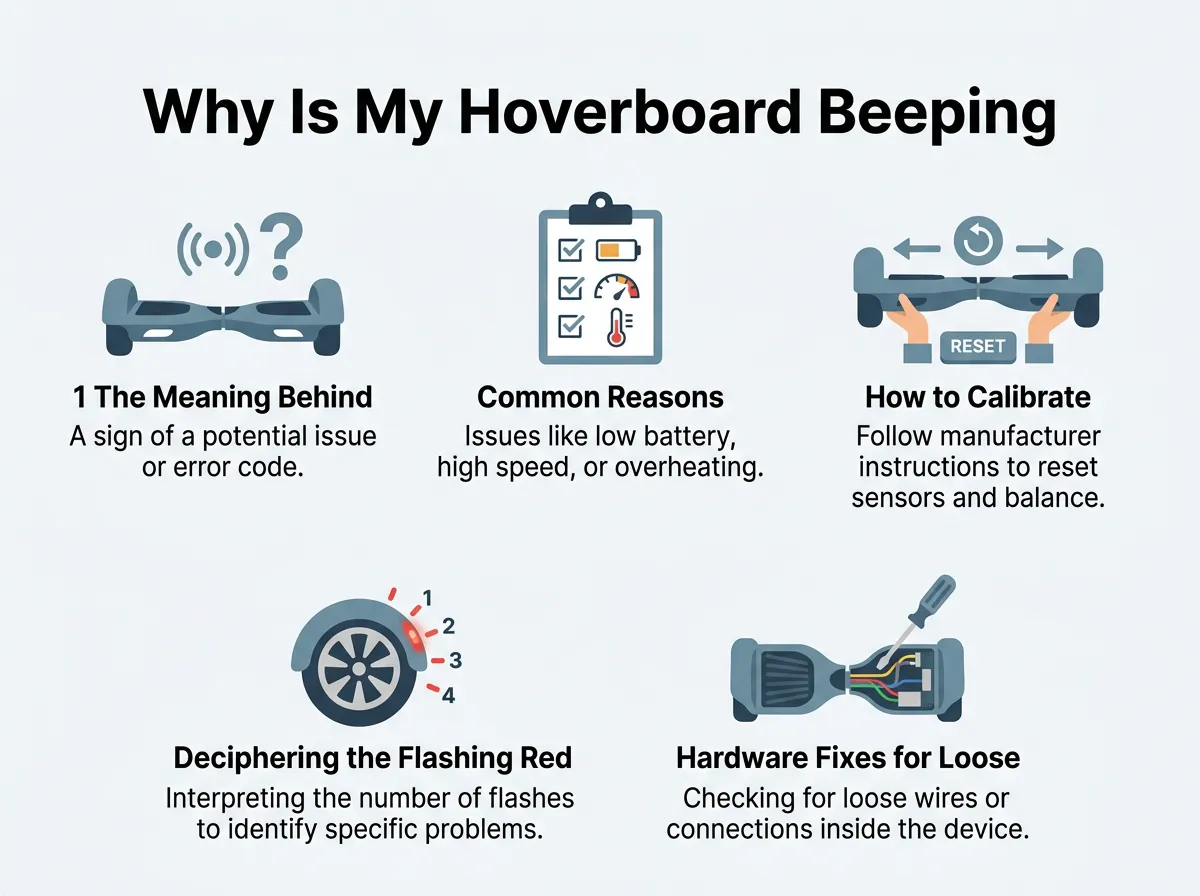
Why Is My Hoverboard Beeping and Flashing Red? — key points at a glance
1. The Board is Out of Calibration
This is the number one cause of hoverboard issues. Over time, your board can lose its balance. This happens if you crash into a wall, ride over bumps, or step off too quickly. The internal sensors get confused about what “flat” means. When they get confused, they set off the alarm. Luckily, this is very easy to fix.
2. Extremely Low Battery
Your board needs a lot of power to keep you balanced. When the battery drops below 10 or 20 percent, it can no longer run safely. The board will flash red and beep to tell you to plug it in. If you ignore this warning, the board will eventually shut off completely. This can cause you to fall off at high speeds.
3. Too Much Tilt
Hoverboards are meant for flat ground. If you try to ride up a very steep hill, the board will struggle. The internal sensors will detect that the angle is too steep. To protect the motor from burning out, the board will start to beep and flash red. The solution here is simple: turn back and find flat ground.
4. Weight Limit Issues
Every hoverboard has a weight limit. If a rider is too heavy for the model, the motors have to work too hard. This causes the internal parts to heat up. The board will beep and flash to let you know it cannot handle the weight. Make sure to check your board’s user manual to see its specific weight limit.
How to Calibrate Your Hoverboard in 5 Easy Steps
If you wonder, “Why Is My Hoverboard Beeping and Flashing Red?”, calibration is the very first thing you should try. It resets the sensors and solves most issues. Follow these five simple steps to calibrate your board:
Step 1: Turn off the board. Make sure your hoverboard is fully powered down. Do not do this while the board is on.
Step 2: Place it on a flat surface. Find a very level floor. A flat kitchen floor or a hardwood floor works best. Avoid thick carpets because they can tilt the board.
Step 3: Align the pedals. Look at the two halves of your hoverboard. Make sure they are perfectly level with each other and with the ground. You can use a bubble level tool if you have one.
Step 4: Press and hold the power button. Press and hold the button for 5 to 10 seconds. Keep holding it down. You will see the lights start to flash. Once the lights flash, you can let go of the button.
Step 5: Turn the board off and on again. Wait about 10 seconds, then press the power button to turn it off. Press it again to turn it back on. Your hoverboard is now calibrated and should work fine.
Deciphering the Flashing Red Light Code
Did calibration not work? If so, you need to look closer at the flashing red light. The number of times the light blinks in a row tells you exactly what is wrong. It is a secret code for your board’s health.
If you are still wondering, “Why Is My Hoverboard Beeping and Flashing Red?”, let us take a closer look at these codes.
According to the troubleshooting experts at StreetSaw, you can count the blinks to find the issue. Here is a quick guide to what the blink codes mean:
- 1 Flash: This is a motherboard issue. It usually means you need to replace the main circuit board.
- 2 or 3 Flashes: This points to an internal wiring problem. A cable might be loose or plugged into the wrong spot.
- 4 or 5 Flashes: This shows a motor issue. The motor inside the wheel on the motherboard side (4 flashes) or battery side (5 flashes) is damaged.
- 6 Flashes: This means a battery failure. You may need to buy a new battery pack.
- 7 or 8 Flashes: This indicates gyroscope issues. These are the small boards that help you balance. They might need to be replaced.
Counting the flashes saves you a lot of time. Instead of guessing, you know exactly where to look for the problem.
Hardware Fixes for Loose Internal Wires
Rough rides can take a toll on your board. If you ride over gravel or jump off curbs, the wires inside can shake loose. This can lead you to ask, “Why Is My Hoverboard Beeping and Flashing Red?” when the board is otherwise fine.
You can check the internal wires yourself with a few basic tools. You will need a phillips screwdriver and a clean table. Here is how you can inspect the wiring:
First, turn off the board and unplug it. Turn it upside down on a soft towel so you do not scratch the shell. Next, use your screwdriver to remove the screws from the bottom cover. Be sure to keep the screws in a safe place so you do not lose them.
Carefully lift the cover. You will see many colored wires connected by plastic plugs. Gently press each plug to make sure it is tight. If you find a loose wire, plug it back in until it clicks. If you still have trouble, you can check out helpful tips on how to fix a hoverboard keep beeping issue to guide you through the process.
Once all wires are secure, put the cover back on. Screw it in tight and turn the board over. Turn it on to see if the red light has gone away.
When is It Time to Replace Your Hoverboard Battery?
Sometimes, the battery is the main culprit. If your board is over a year old and you ride it every day, the battery will degrade. A bad battery cannot hold a charge. It will drop in voltage quickly, causing the board to beep and flash red almost as soon as you step on it.
How do you know if the battery is dead? Try charging it fully. If the green light on the charger comes on quickly, but the board dies after two minutes of riding, the battery is likely dead. You can purchase a replacement battery online. Make sure to buy a UL-certified battery. This ensures the battery is safe and will not overheat.
Conclusion
Seeing a flashing red light and hearing a constant beep can be scary. But in most cases, it is not a major disaster. Now you have a complete guide to help you answer, “Why Is My Hoverboard Beeping and Flashing Red?”. Most of the time, a simple five-step calibration will fix the issue. If that does not work, counting the red light flashes or checking for loose wires will point you in the right direction.
Always remember to prioritize safety. Never ride your hoverboard while it is actively warning you of an error. With a little patience and the steps in this guide, you will be back to gliding down the street in no time!
Frequently Asked Questions
Can I ride my hoverboard while it is beeping?
No, you should never ride a hoverboard that is beeping. The beep indicates that the self-balancing system is turned off, which can cause you to fall. Always stop and fix the issue before riding again.
Why does my hoverboard beep when I go fast?
Your hoverboard will beep when you reach its maximum speed limit. This is a built-in safety alarm to warn you to slow down. If you continue to speed, the board will shut off or push back to keep you safe.
How long does it take to calibrate a hoverboard?
Calibrating a hoverboard is very quick and usually takes less than one minute. You simply need to turn the board off, level the footpads, hold the power button for a few seconds, and restart it.
Why is my hoverboard flashing red while charging?
A flashing red light while charging usually means the battery is extremely low and is currently drawing a large amount of power. If the light stays red for hours without turning green, your charger or battery might be broken.
What does 1 red flash mean on a hoverboard?
One single flash of the red light typically indicates an issue with the main motherboard. This often means the internal computer board has failed and needs to be replaced.
Does a hoverboard reset delete my settings?
A hoverboard calibration reset does not delete any complex data because these boards do not have hard drives. It simply resets the tilt sensors to help the board find its true level balance point again.
