


If your hoverboard is beeping, it is usually a warning sign that the board is out of calibration, running low on battery, or being ridden on an unsafe slope. To stop the beep, place the hoverboard on a completely flat surface, turn it off, and hold the power button for ten seconds to recalibrate the system. If the noise continues, check your battery life or inspect your board for loose internal wiring.
Picture this. You are gliding down the sidewalk on a sunny afternoon. The breeze is in your hair, and you feel like you are flying. Suddenly, a loud, high-pitched beeping noise cuts through the air. Everyone on the street turns to look at you. Your smooth ride has turned into an embarrassing, noisy ordeal.
This is a common issue that almost every hoverboard rider faces at some point. It is annoying, but you do not need to panic. The beep is actually your board’s way of talking to you. It is a safety feature built to keep you safe from crashes. If your board is making noise, you are likely wondering how to stop a hoverboard from beeping? Luckily, the fix is usually very simple, and you can do it right at home without any special tools.
In this guide, we will break down the mystery behind those loud beeping noises. We will look at why your board is crying out for help. More importantly, we will give you easy, step-by-step methods to silence the noise and get back to riding in peace.
Key Takeaways
- Calibration is key: Most beeping sounds occur when the board’s internal gyroscopes lose balance and need a quick reset.
- Charge the battery: A low battery triggers warning beeps to alert you before the system shuts down suddenly.
- Ride on flat ground: Slopes steeper than 15 degrees or rough surfaces will trigger built-in safety sensors.
- Check internal wires: Loose connectors inside the casing can mimic balance errors and cause constant noise.
- Avoid speeding: Moving too fast triggers an automatic safety alarm to protect you from falling off.
- Never ignore alarms: Beeping is a safety feature designed to keep you from getting hurt.
📑 Table of Contents
Why Is My Hoverboard Beeping?
To fix the noise, you first need to understand why it is happening. Your hoverboard has built-in smart sensors and gyroscopes. These parts work together to keep you upright. When something goes wrong with these parts, the board alerts you with a loud sound. Knowing the triggers will help you stop the noise fast.
Out of Balance and Calibration
This is the most common reason for a noisy board. If you kick the board, fall off, or ride over bumpy ground, the gyroscopes can lose track of what is flat. When the board gets confused about where the center of gravity is, it will beep. It will also lock up to prevent you from falling.
Low Battery Levels
Just like your phone, your hoverboard needs power to work properly. When the battery drops below a safe level, the board will start to beep. This is a crucial warning. If the battery dies completely while you are riding, the wheels will lock up. This can throw you off the front of the board, which can cause painful scrapes or bruises.
Speed and Surface Limits
Every hoverboard has a speed limit. If you go too fast down a hill, the board will beep to warn you. It is telling you to slow down. The same thing happens when you try to climb a steep hill. Most boards cannot handle slopes greater than 15 degrees. If you push the board past its limits, it will scream for help.
How to Stop a Hoverboard From Beeping: The Calibration Method
If you want to know how to stop a hoverboard from beeping?, calibration is your best first step. Over 80 percent of beeping issues are solved by a simple reset. This process aligns the internal sensors and tells the computer what a flat surface looks like. Here is how to do it in four easy steps:
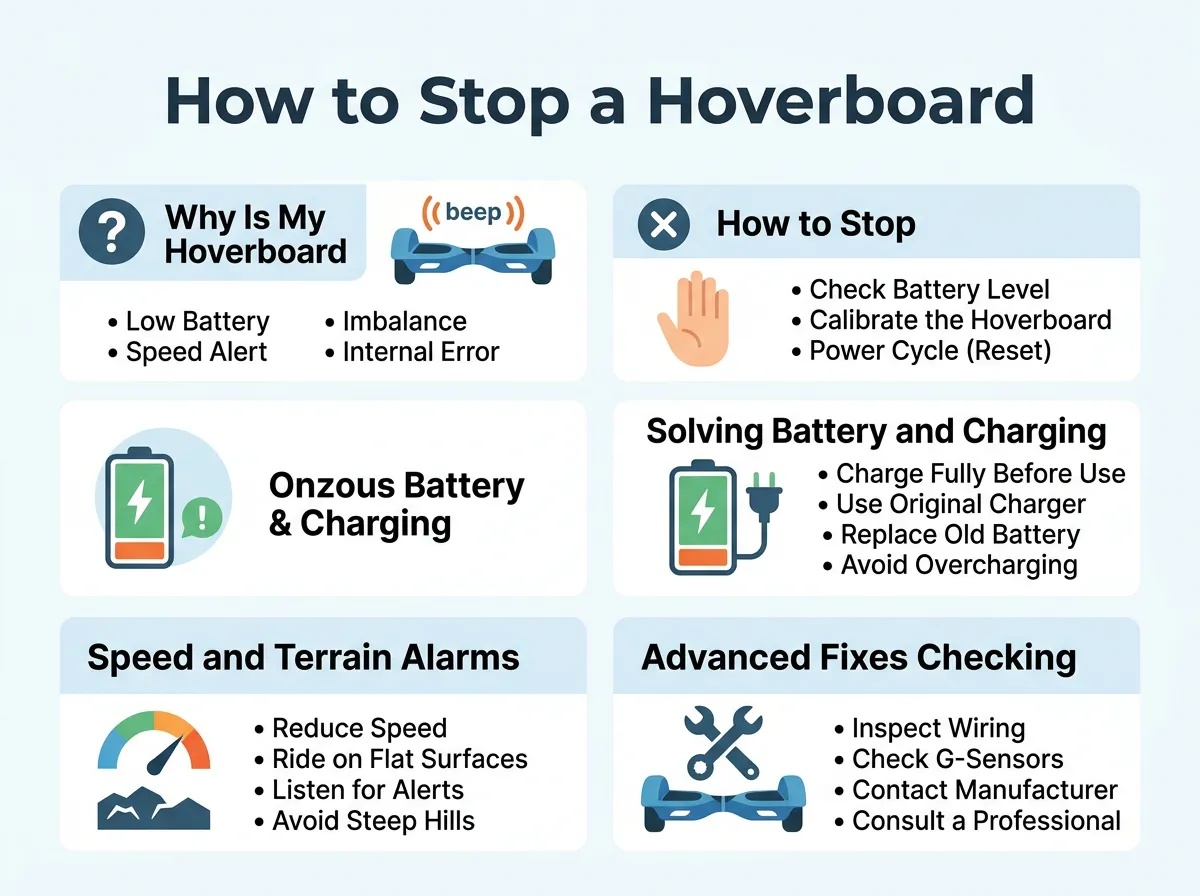
How to Stop a Hoverboard From Beeping? — key points at a glance
Step 1: Find a Flat Surface
First, find a completely flat spot. A smooth kitchen floor or a flat table is perfect. Do not try to calibrate your board on carpet or grass. If the surface is uneven, the sensors will lock in the wrong angle, and the beeping will continue.
Step 2: Turn the Board Off
Turn your hoverboard off completely. Do not leave it in standby mode. Make sure both sides of the board are perfectly level with each other and parallel to the ground.
Step 3: Hold the Power Button
Press and hold the power button down for about 8 to 10 seconds. Keep your finger on the button. After a few seconds, you will hear a beep, and the LED lights will start to flash. This means the board is in calibration mode. You can release the power button now. Let the lights flash for another 15 seconds so the system can clear its memory.
Step 4: Restart the Board
Press the power button again to turn the hoverboard off. This saves the new settings. Now, turn the board back on. The beeping should be gone, and the board should balance perfectly.
Solving Battery and Charging Quirks
Sometimes, calibration does not stop the noise. If the beep continues, your battery might be the culprit. A weak battery can cause the system to fail, leading to non-stop noises. For more troubleshooting on battery alarms, check out the My hoverboard is beeping help center page to see how different brands handle power errors.
To fix power-related beeping, make sure you charge your board fully. Connect the charger to the wall first. The light on the charger brick should be green. Next, plug the charger into your hoverboard. The light should turn red, indicating that the board is taking in power. Leave it plugged in until the light turns green again.
Avoid overcharging your board. Leaving it plugged in overnight can damage the battery cells. If your board start beeping the moment you step on it, even after a full charge, the battery pack may be dead and need a replacement.
Speed and Terrain Alarms
Are you riding on a smooth pavement when the sound starts? If so, you might be pushing the speed limits of your motor. It helps to spend some time understanding those irritating noises so you can tell a speed warning apart from a system error.
When you exceed the top speed, lean back slightly to slow down. This reduces the load on the motor and stops the noise. Also, watch out for cracks in the concrete. When you ride over rough ground, the tires can lose contact with the floor. This causes the wheels to spin at different speeds, which triggers an instant warning beep.
Advanced Fixes: Checking for Loose Wires
If you have tried calibrating and charging, but your board still makes noise, you might have a loose wire inside. Hoverboards contain many small wires that connect the gyroscopes to the main motherboard. Riding over bumps can shake these connections loose over time.
To inspect your board, you will need a screwdriver. Turn off the board first. Unscrew the bottom plastic cover carefully. Look for any wires that are disconnected or loose. You will see colored cables that plug into the green motherboard. Gently press each connector to make sure it is snug. If you see blinking red lights inside the casing, you can refer to this red lights and constant beeping fix guide to diagnose the exact error code.
Preventive Tips to Keep Your Ride Quiet
The best way to deal with a beeping hoverboard is to prevent the issues from happening in the first place. Follow these simple tips to keep your board running silently:
- Store it properly: Keep your hoverboard in a dry, cool place. Extreme heat or cold can ruin the battery.
- Step on carefully: When mounting the board, step on quickly and firmly. Do not hesitate, as slow stepping can confuse the gyroscopes.
- Avoid water: Most hoverboards are not waterproof. Wet streets can short out the sensors and cause constant beeps.
- Keep tires clean: Dirt and hair can wrap around the wheel axles, making the motor work harder and trigger heat alarms.
Conclusion
Dealing with a noisy ride can be very annoying, but it does not mean your board is broken. In most cases, knowing how to stop a hoverboard from beeping? is as simple as finding a flat floor and resetting the system. Always start with calibration. If that does not work, move on to the battery, and then inspect the wires if needed. Take care of your board, and it will give you miles of quiet, smooth, and fun riding!
Frequently Asked Questions
Why does my hoverboard beep when I step on it?
This usually happens because the board is not level when you mount it, or the gyroscopes need calibration. It can also happen if you step on the sensors too slowly, which confuses the balancing system. Try a quick system reset to fix this issue.
How do I know if my hoverboard battery is bad?
If your board starts beeping immediately after a full charge, or if it dies within a few minutes of riding, your battery is likely degraded. You will need to replace the battery pack with a certified safe replacement. Always check the charger indicator light to confirm it is receiving power.
Can I ride my hoverboard while it is beeping?
No, you should never ride your hoverboard while it is actively warning you with beeps. The beep indicates a system error, a low battery, or a speed limit breach, which could cause the board to stop suddenly and throw you off. Stop immediately and solve the issue before getting back on.
Why is my hoverboard flashing red and making a sound?
A flashing red light combined with a beep is a sign of a critical system error, often related to a faulty gyroscope or a loose internal connection. Count the number of flashes, as this often indicates an error code that tells you which side of the board is failing. Calibrating the board can often reset this light.
Does a hoverboard beep when it is fully charged?
No, hoverboards do not usually beep to indicate a full charge. Instead, the small indicator light on the charger brick will turn from red to solid green. If your board is plugged in and making noise, unplug it immediately and check for a charging system fault.
Why does my hoverboard beep when I go fast?
This is a built-in safety feature designed to prevent you from exceeding the maximum speed limit of the motor. When you hear this warning sound, you should lean back slightly to slow down your speed. Continuing to accelerate past this warning can cause the motors to shut down to protect the system.
