


If your hoverboard is shaking while you ride, the issue is usually caused by incorrect foot placement, being under the minimum weight limit, or sensors that need recalibration. You can easily fix this annoying vibration by standing wider, checking the weight limit, or performing a quick system reset.
Picture this. You finally get your hands on a brand-new hoverboard. You charge the battery, place it on the flat ground, and step on. You are ready for a smooth, futuristic ride down the street. But as soon as you put your weight on it, the board starts to vibrate wildly. It feels like an earthquake under your feet! You feel shaky, unstable, and ready to fall off.
This shaking sensation is a very common issue for riders of all ages. It can be scary, especially for beginners who are still trying to find their balance. If you have ever asked yourself, Why Does My Hoverboard Shake When Riding?, you are definitely not alone. The good news is that this shaking is rarely a sign of a completely broken board. In most cases, it is a simple issue that you can fix in just a few minutes.
In this guide, we will explore the main reasons behind this trembling behavior. We will look at how hoverboard sensors work, how your stance affects the ride, and how to calibrate your board. By the end of this article, you will know exactly how to make your hoverboard ride as smooth as silk once again.
Key Takeaways
- Minimum Weight: Hoverboards need a minimum weight of 44 pounds to trigger the footplate sensors correctly.
- Foot Placement: Standing too close to the middle causes the board to wobble; keep your feet wide and close to the wheels.
- Calibration is Key: A quick system reset can instantly solve sensor confusion and stop the shaking.
- Battery Levels: Low battery power can cause the motor to stutter and vibrate erratically.
- Mechanical Checks: Loose casing screws or worn-out wheel bearings can also lead to shaking.
📑 Table of Contents
1. Understanding Hoverboard Sensors and Weight Limits
To understand why your hoverboard shakes, you first need to know how it senses your body. Underneath the rubber footpads of your hoverboard lie clever gyroscopic sensors. These sensors detect pressure. When you lean forward, they tell the motors to spin the wheels forward. When you lean back, the wheels reverse. It is a smart system, but it relies on accurate pressure detection.
The Role of Gyroscopic Sensors
Each side of the hoverboard operates on its own sensor. If you do not apply enough pressure to these sensors, they can get confused. They turn on and off very quickly. This rapid switching creates a stuttering effect. That stuttering is the vibrating and shaking you feel under your feet. For more details on these sensor mechanics, you can read about common hoverboard shaking fixes to see how these parts interact.
Meeting the Minimum Weight Requirement
This weight issue is one of the top answers to the question, Why Does My Hoverboard Shake When Riding?. Most standard hoverboards have a minimum weight limit of 44 pounds (20 kg). If a light child tries to ride a full-sized hoverboard, their feet will not put enough continuous pressure on the sensors. The board thinks someone is stepping on and off repeatedly. This causes the machine to shake violently. Always check your board’s manual to ensure the rider meets the minimum weight requirement.
2. How Foot Placement Affects Balance
Sometimes, the board is fine and the rider is heavy enough, but the feet are in the wrong place. When trying to figure out Why Does My Hoverboard Shake When Riding?, we must look at how we stand on the board. Proper foot placement is key to a smooth and safe ride.
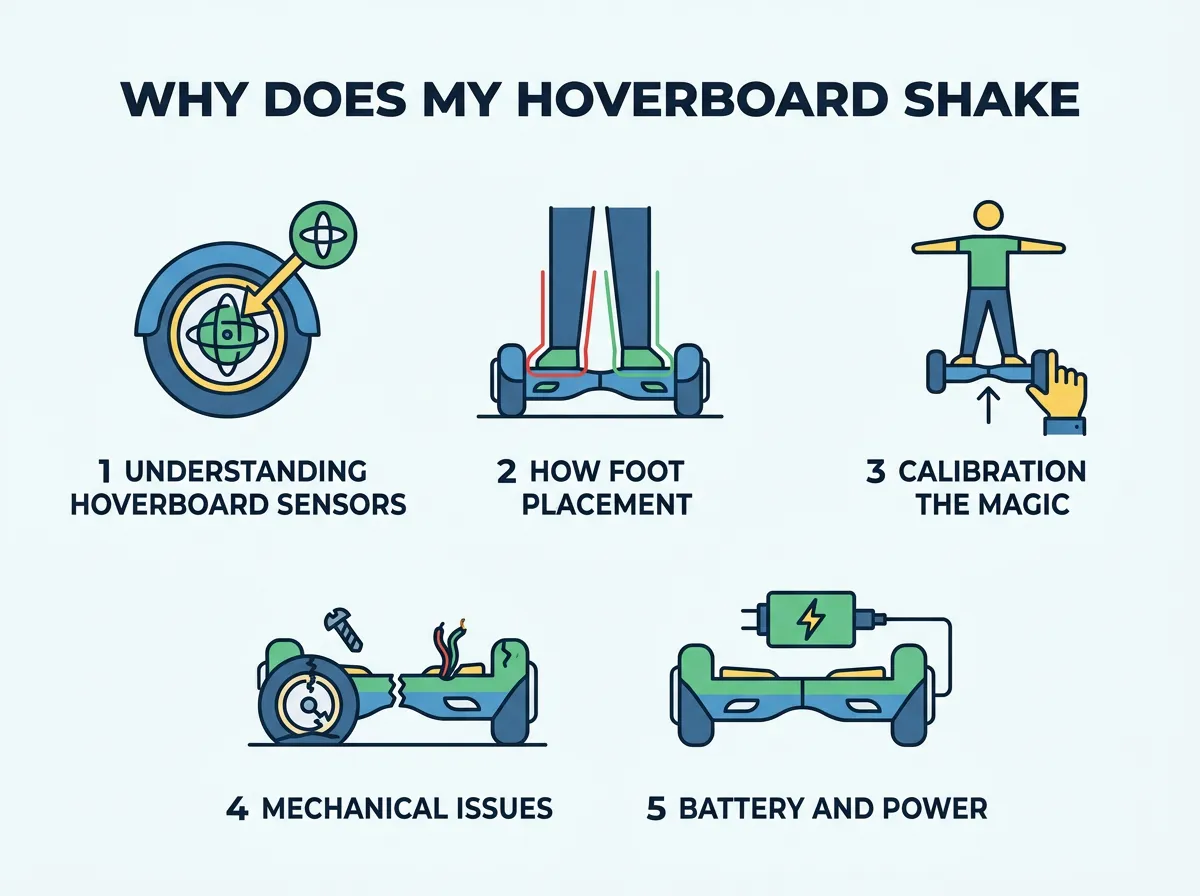
Why Does My Hoverboard Shake When Riding? — key points at a glance
Finding the Sweet Spot
Many beginners make the mistake of standing too close to the middle of the hoverboard. The middle of the board does not contain the pressure sensors. If your feet are too close together, you cannot trigger the sensors properly. To fix this, always place your feet as wide as possible. Your outer ankles should almost touch the plastic wheel arches. This wide stance gives you maximum control and keeps the sensors fully engaged.
The “Mount and Dismount” Shakes
Another common moment for shaking is when you step on or off the board. If you hesitate, you might put pressure on only one side. This causes that single wheel to spin while the other stays still, resulting in a sudden spin or shake. To prevent this, step on quickly and confidently, one foot at a time. When getting off, step backward off the board in one swift, clean motion.
3. Calibration: The Magic Reset Button
If you are standing correctly and meet the weight limit, but the shaking continues, your board might just be confused. Hoverboards have internal computers that need to know what “flat and level” feels like. Over time, bumps, crashes, and rough riding can throw off this internal sense of balance. If you ask a tech helper, Why Does My Hoverboard Shake When Riding?, their very first suggestion will usually be to calibrate it.
Why Calibration Is Necessary
Think of calibration as resetting the brain of your hoverboard. If the board thinks tilted is flat, it will constantly try to correct itself. This continuous self-correction looks and feels like a fast, jittery shaking. You can find many discussions on hoverboard shaking causes online that highlight calibration as the number one fix for this problem.
How to Calibrate Your Hoverboard Step-by-Step
Calibrating your hoverboard is very easy and takes less than a minute. Just follow these simple steps:
- Step 1: Turn off your hoverboard completely.
- Step 2: Place the board on a completely flat, level surface. Use a spirit level if you have one to make sure it is perfect.
- Step 3: Align both foot pedals so they are perfectly level with the ground and parallel to each other.
- Step 4: Press and hold the power button down for about 5 to 10 seconds. Keep holding until the LED lights start flashing.
- Step 5: Release the power button and let the lights flash for another 5 seconds.
- Step 6: Turn the hoverboard off to lock in the new calibration.
- Step 7: Turn the board back on. Your hoverboard is now reset and should ride smoothly!
4. Mechanical Issues and Wheel Damage
If calibration does not do the trick, you might have a physical or mechanical issue. Hoverboards are tough, but they are not indestructible. Rough terrain can take a toll on the internal components.
Loose Screws and Internal Parts
Over time, the vibrations from riding on concrete can loosen the screws inside the hoverboard shell. If the motherboard or the sensor mounts become loose, they will rattle around. This loose movement causes the gyroscopes to register false movements, leading to a shaking ride. You can check this by gently shaking the turned-off board. If you hear parts rattling inside, it may be time to tighten the internal screws.
Tire and Wheel Alignment Problems
Check your tires. If you have air-filled tires, make sure they are pumped to the correct pressure. Uneven tire pressure will make one side ride lower than the other, causing a wobble. If you have solid rubber tires, look for chunks of missing rubber or flat spots. A deformed wheel will create a rhythmic shaking that gets faster as you speed up. For severe mechanical failures, seeking professional hoverboard repair advice is the best path forward to ensure safety.
5. Battery and Power Fluctuations
Your hoverboard requires a steady flow of electrical power to keep its balance. If the power supply drops, the performance of the motors and sensors drops with it.
Low Battery Warnings
People often ask, Why Does My Hoverboard Shake When Riding?, without realizing their battery is almost empty. When a hoverboard battery drops below 20%, it struggles to provide enough power to the self-balancing motors. This power struggle can cause the board to stutter, shake, or beep loudly. If your board start shaking toward the end of a long riding session, it is simply telling you that it needs to be charged.
Battery Care Tips
To keep your battery healthy, avoid leaving your hoverboard on the charger overnight. Overcharging can degrade the lithium-ion cells. Always use the charger that came with your specific board, and store your hoverboard in a cool, dry place when you are not using it.
6. Troubleshooting Checklist for Beginners
Before you get frustrated and pack your hoverboard away, go through this simple checklist. Most riders can solve their shaking issue in under five minutes by following these steps:
- Check the Rider’s Weight: Ensure the rider is over the 44-pound limit.
- Adjust Your Feet: Move your feet wider, right up against the plastic wheel guards.
- Perform a Calibration: Use the step-by-step calibration guide above to reset the gyros.
- Charge the Battery: Give the board a full charge and try again.
- Inspect the Wheels: Check for dirt, hair, or debris wrapped around the wheel axles.
Conclusion
Riding a hoverboard should feel like gliding on air, not standing on a washing machine during a spin cycle. Hopefully, this guide has answered your question: Why Does My Hoverboard Shake When Riding?. In most cases, a quick shift in your stance, meeting the weight limit, or a simple system calibration will have you rolling smoothly again. If the shaking persists after trying all these fixes, you may be dealing with a loose internal wire or a faulty sensor. In that case, do not hesitate to contact a professional repair service. Stay safe, stand wide, and enjoy your ride!
Frequently Asked Questions
Why does my hoverboard shake when I step on it?
This shaking is usually caused by hesitant foot placement or not putting enough weight on the pressure sensors. To fix this, step on quickly and firmly, placing your feet as wide as possible near the wheels. If you are too light for the board, the sensors will also stutter and shake.
How do I calibrate my hoverboard to stop it from shaking?
Turn the board off, place it on a perfectly flat surface, and align the footpads. Hold the power button down for 5 to 10 seconds until the lights flash, then release it. Turn the hoverboard off to save the settings, and turn it back on to ride normally.
Can a low battery cause a hoverboard to vibrate?
Yes, a low battery cannot deliver consistent power to the motors and gyroscopic sensors. This drop in power causes the system to struggle to maintain balance, resulting in a jittery or shaking motion. Charging your board to full capacity should solve this issue.
Is there a minimum weight limit for riding a hoverboard?
Yes, most standard-sized hoverboards require a minimum weight of 44 pounds (20 kg) to activate the internal sensors. If a rider is below this weight limit, the board will shake because it cannot tell if someone is actually standing on it.
What does it mean when only one side of my hoverboard shakes?
If only one side is vibrating, it usually means that specific side’s sensor is dirty, loose, or needs to be calibrated. Make sure your foot is centered properly over that side’s rubber pad, and perform a system calibration to reset the sensors.
Do loose internal screws cause hoverboards to wobble?
Yes, loose internal screws can cause the gyroscopes or motherboard to rattle around inside the plastic shell. This physical rattling sends confusing signals to the motors, which makes the entire hoverboard shake and wobble while you ride.
