


If your hoverboard is vibrating, it is usually because the foot sensors are not fully pressed down, often due to a rider being too light. It can also happen when the board needs a simple system recalibration to align its internal gyroscopes. Ensuring proper foot placement and resetting your device will resolve this common shaking issue in most cases.
Imagine this scenario. You step onto your brand-new hoverboard. You are ready to glide down the street. But as soon as your second foot lands, the board starts to shake like crazy. It vibrates so hard that your feet slide right off. You might feel a bit scared. Is the board broken? Is it going to break apart under your feet? Do not worry. This is a very common issue that many riders face, especially beginners.
Hoverboards are smart devices. They use sensors and motors to keep you balanced. When something goes wrong with those signals, the board gets confused. It tries to correct itself too fast. This causes the fast shaking you feel. In this guide, we will answer the question: why does my hoverboard vibrate? We will cover the most common reasons and give you simple steps to fix each one.
Key Takeaways
- Weight Limit Matters: If a rider is below the minimum weight limit, the hoverboard sensors will struggle to detect them.
- Foot Placement is Key: Placing your feet too close to the wheels or too far inward can trigger constant shaking.
- Calibration Solves Most Issues: A simple factory reset aligns the internal gyroscopes and stops random vibrations.
- Check for Loose Parts: Internal screws, loose wheels, or cracked casings can lead to vibrating noises.
- Low Battery Effects: When the battery drains, the motors may struggle to keep the board stable, causing jitters.
- Avoid Wet Sensors: Water damage can ruin the sensors and cause the board to vibrate violently.
📑 Table of Contents
1. Understanding the Weight Limit Issue
One of the most common reasons your board shakes is weight. Every hoverboard has a weight limit. This includes a maximum weight and a minimum weight. Many people forget about the minimum weight limit. If a rider is too light, the board will struggle to feel them.
The Minimum Weight Requirement
Most standard hoverboards require a rider to weigh at least 44 pounds (20 kilograms). Some larger boards require even more. If a young child steps on the board, their weight is not enough to press down the sensors. The board thinks someone is getting on and off very quickly. This makes the motors turn on and off in rapid succession. The result is a violent vibration. This issue is very common among kids who do not weigh enough to trigger the switches, which is explained in depth on the Hoverboard Repair support page.
How to Help Lighter Riders
If your child is too light, they should not ride the board yet. It is not safe. However, you can try a few things if they are right on the edge of the weight limit. Make sure they wear heavy shoes or a small, weighted backpack. This can add just enough weight to keep the sensors pressed down. But the safest option is always to wait until they grow a little bigger or buy a board made for small kids.
2. The Importance of Proper Foot Placement
Where you put your feet matters a lot. Your hoverboard has rubber pads on top. Under these pads are physical switches. When you step on the pads, you push the switches down. This tells the board to move.
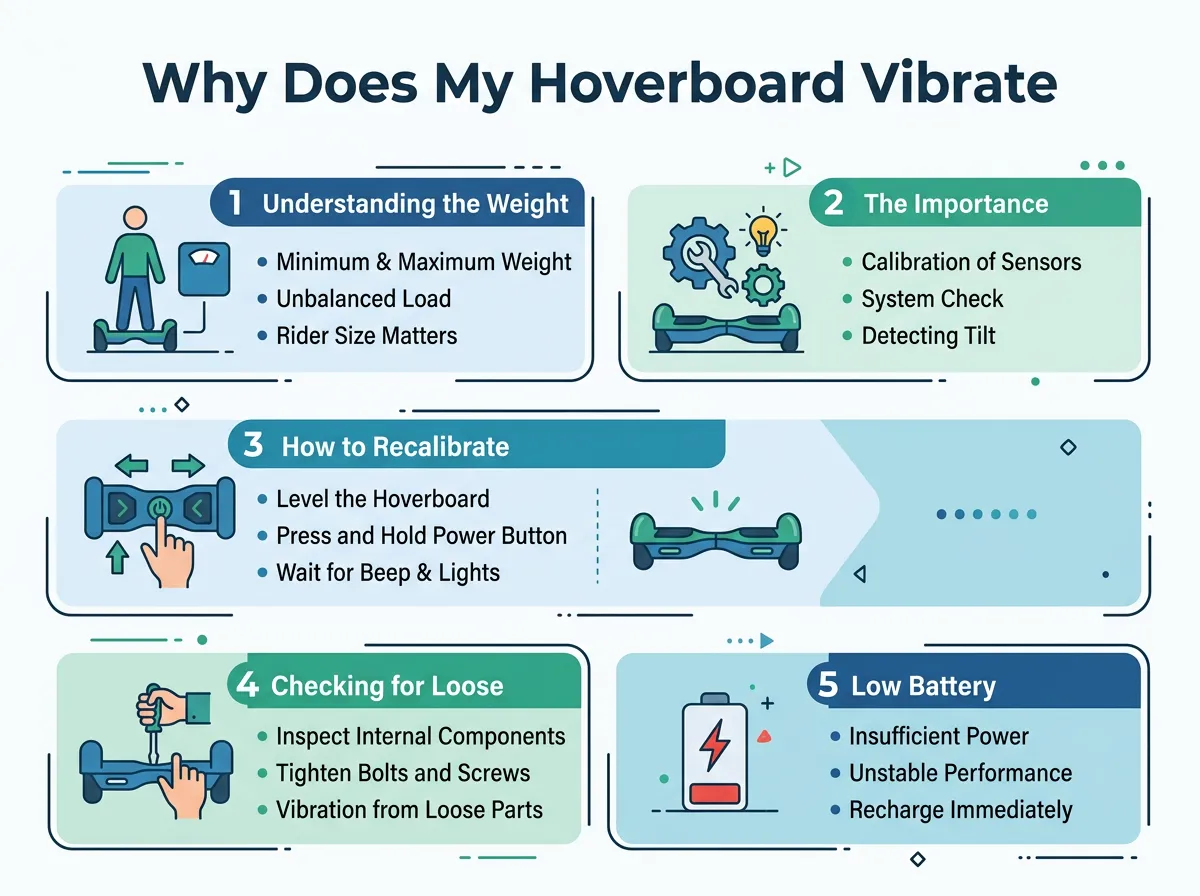
Why Does My Hoverboard Vibrate? — key points at a glance
Finding the Sensor Sweet Spot
To ride smoothly, you must place your feet flat on the pads. Your feet should be wide apart. They should be close to the wheels, but not touching them. This puts your weight directly over the sensors. If you stand too close to the middle of the board, you will not press the switches fully. This can cause the board to stutter and shake.
Common Foot Placement Mistakes
Beginners often hesitate when stepping onto a hoverboard. They might put one foot on, pause, and then slowly lift the other. This delay confuses the board. The board tries to balance with only one foot on the sensor. This causes a loud vibration. When you get on, you must step up quickly and confidently. Practice near a wall or a friend’s shoulder so you can step on fast without falling.
3. How to Recalibrate Your Hoverboard
Over time, your hoverboard can lose its balance. This happens if you crash, drop it, or ride on bumpy ground. The gyroscopes inside get out of line. When this happens, the board does not know what “flat” means. It will shake as it tries to find its balance. The best fix for this is calibration.
Step-by-Step Calibration Guide
Calibrating your hoverboard is very easy. It is like doing a factory reset. You do not need any special tools. Just follow these simple steps:
- Turn off your hoverboard completely.
- Place the board on a flat, level floor. Use a bubble level if you have one.
- Make sure both foot pedals are perfectly level with each other.
- Press and hold the power button down for about 10 seconds.
- Keep holding it until the lights start flashing or you hear a beep.
- Let go of the power button and wait for the lights to stop flashing. This may take 30 seconds.
- Turn the board off, then turn it back on.
To learn more about recalibrating your board, you can check out this helpful Gyroorboard troubleshooting guide to get started. This quick reset fixes about 80 percent of all shaking issues.
When to Recalibrate
You should recalibrate your board every few weeks. It is also a good idea to do this after any hard crash. Think of it as tuning an instrument. It keeps your ride smooth and safe.
4. Checking for Loose Parts and Internal Damage
If calibration does not help, you might have a mechanical problem. Hoverboards are tough, but they are not indestructible. Rough riding can loosen things inside.
Loose Screws and Wheel Hubs
Inside the board, screws hold the motors and gyroscopes in place. If these screws come loose, the parts will wiggle. When the motor spins, it will cause the whole board to rattle. You can check for this by gently shaking the board when it is turned off. If you hear parts rattling inside, you may need to open the case. Use a screwdriver to tighten any loose screws you find. Be careful not to touch the battery or wires while doing this.
Cracked Plastic Shells
The plastic outer shell protects the inner workings. If the shell is cracked, it can rub against the wheels. This friction can feel like a vibration. Check the body of your board for cracks. If you see any, you may need to replace the shell. If your board shakes when you step on it, look at StreetSaw’s guide on hoverboard shaking for direct advice on sensor replacement and mechanical checks.
5. Low Battery and Wet Sensors
Sometimes, the issue is not mechanical. It can be related to power or water damage.
The Power Struggle
When your hoverboard battery gets low, the motors lose power. They struggle to keep you upright. The board may start to shake as it tries to balance with very little energy. Always charge your board fully before riding. If the shaking only happens when the battery light is red, you just need a charge.
Moisture in the Board
Never ride your hoverboard in the rain or through puddles. Most boards are not waterproof. If water gets inside, it can short out the sensors. This makes them send erratic signals to the motor, causing violent shakes. If your board got wet, turn it off immediately. Put it in a dry, warm room for 48 hours before turning it on again.
Conclusion
Feeling your hoverboard shake can be scary, but it is usually an easy fix. Most of the time, the issue is just low weight, bad foot placement, or a need for a quick reset. By following the tips in this guide, you can get back to riding smoothly in no time. Always stay safe, wear a helmet, and keep your board calibrated!
Frequently Asked Questions
Why does my hoverboard shake when I get on?
This shaking usually happens because you are stepping on the board too slowly or your feet are not in the right spot. It can also occur if you do not meet the minimum weight limit for the board. Try stepping on quickly and placing your feet wide apart near the wheels.
How do I calibrate my hoverboard to stop it from vibrating?
To calibrate your board, turn it off and place it on a flat surface. Hold the power button down for about ten seconds until the lights flash, then release it. Turn the board off and back on to complete the reset process.
Can a low battery cause a hoverboard to vibrate?
Yes, a low battery can make your hoverboard vibrate. When the battery is almost empty, the motors do not get enough power to balance properly. Simply plug the board in and let it charge fully to solve this issue.
What is the minimum weight for a hoverboard?
Most standard hoverboards require the rider to weigh at least 44 pounds. If the rider is lighter than this, the foot sensors will not stay pressed down. This causes the board to shake violently as it tries to sense your feet.
Why does my hoverboard shake when I stand still?
If your board shakes while you stand still, it may need to be calibrated. It could also mean your feet are placed too close to the center of the board. Try adjusting your feet wider or performing a quick system reset.
Is a vibrating hoverboard dangerous to ride?
Yes, riding a vibrating hoverboard can be dangerous because it can cause you to lose your balance and fall. It is best to step off the board immediately when it starts shaking. Do not ride it again until you have fixed the issue.
