


To keep your hoverboard running safely and smoothly, you should perform basic cleaning and wheel checks after every single ride. A deeper inspection of the battery, structural screws, and system calibration is highly recommended once a month or every 50 miles. Taking just a few minutes for routine maintenance will prevent costly repairs and extend the life of your favorite ride.
Imagine you are gliding down the street on a bright, sunny day. The wind is in your face, and your hoverboard feels like a natural extension of your feet. Suddenly, you feel a strange vibration. The board tilts to one side, makes a loud squeaking noise, and slowly grinds to a halt. This annoying scenario is more common than you might think, and it usually happens when you least expect it.
Hoverboards are incredible pieces of technology. They combine electric motors, gyroscopes, and lithium-ion batteries into a sleek, self-balancing ride. But because they have so many moving parts, they need regular attention. If you want to keep your ride smooth and avoid costly replacements, you have to ask yourself: how often should you maintain a hoverboard?
In this guide, we will break down the ideal maintenance schedule for your hoverboard. We will cover quick daily habits, easy weekly checks, and deep monthly inspections. By the end, you will know exactly how to keep your board safe, fast, and ready for your next adventure.
Key Takeaways
- Daily Cleaning: Wipe down your board and clear the wheels after every ride to stop dirt buildup.
- Monthly Diagnostics: Perform deep checks on the battery, frame, and calibration every month.
- Smart Battery Care: Never leave the charger plugged in overnight to protect the battery pack.
- Recalibrate Often: Reset your hoverboard balance whenever it feels shaky or tilts.
- Store Safely: Keep your board in a dry, warm room rather than a cold, damp garage.
- Inspect the Tires: Check the rubber tread regularly for sharp objects or uneven wear.
📑 Table of Contents
The Daily Routine: Quick Checks After Every Ride
You do not need to pull out a toolbox every time you ride your hoverboard. However, spending just two minutes on your board after a ride can save you hours of work later. These quick habits keep small problems from turning into major repairs.
Wipe Down the Outer Shell
Your hoverboard travels close to the ground, where it picks up dust, mud, and grass clippings. Use a soft, dry microfiber cloth to wipe the plastic shell after every ride. If there is stubborn mud, use a slightly damp cloth. Never spray water directly onto your board. Water can easily seep through the seams and ruin the sensitive circuit boards inside.
Clear Out the Wheels and Axles
Take a close look at the gap between the wheels and the main plastic body. Hair, string, and small twigs love to wrap around the wheel axles. If you leave them there, they will tighten over time. This friction slows down your motor and drains your battery quickly. Gently pull out any debris with your fingers or a pair of tweezers after you finish riding.
The Weekly Check: Battery Health and Hardware
If you ride your hoverboard a few times a week, you should perform a slightly deeper check once every seven days. This routine focuses on the power source and the structural parts of your board.
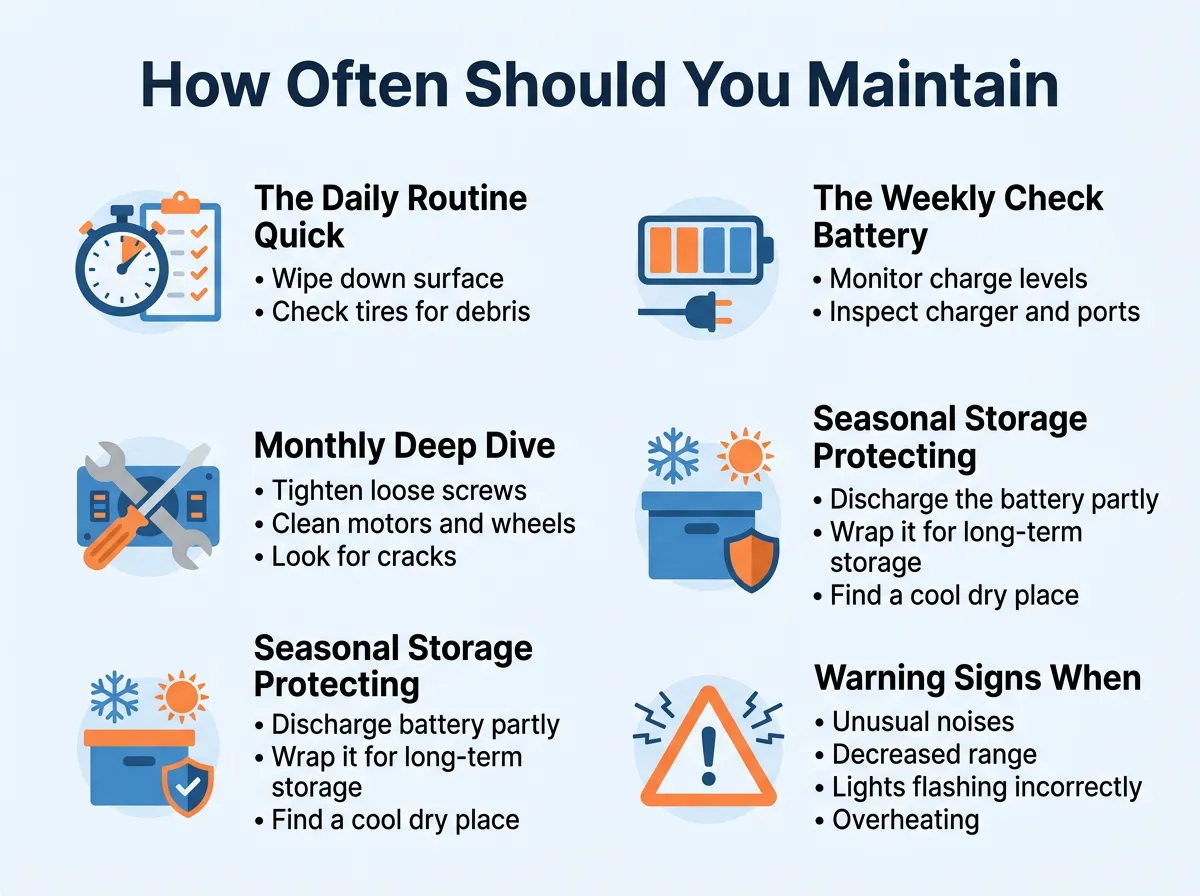
How Often Should You Maintain a Hoverboard? — key points at a glance
Smart Charging Habits
How you charge your board determines how long it will live. To keep your battery healthy, try not to let it drop to zero percent. Charge it when the battery indicator turns yellow or red. Use only the charger that came in the box. Cheap, third-party chargers can overheat the battery pack. Applying these essential hoverboard care tips will keep your battery safe and fully powered for years to come.
Inspect the Charging Port
Dust and pocket lint can easily settle inside the charging port. Take a quick look inside the port with a flashlight once a week. If you see dirt, gently blow it out with a can of compressed air. Do not stick metal objects like keys or paperclips into the port. Metal can short-circuit the connection and spark, which is very dangerous.
The Monthly Deep Dive: Calibration and Structural Checks
Once a month, or after every 50 miles of riding, you should dedicate about fifteen minutes to a thorough checkup. This is where you test the internal systems and ensure everything is physically secure.
How to Calibrate Your Hoverboard
Over time, the gyroscopes inside your board can lose their sense of balance. If your board feels shaky, pulls to one side, or is hard to mount, it needs calibration. To do this, turn off the board. Place it on a perfectly flat floor. Align both foot pedals so they are level with the ground. Press and hold the power button for about ten seconds. The lights will flash, and you will hear a beep. Turn the board off and back on again. Your board is now perfectly calibrated!
Tighten the Screws and Shell
Riding over bumps and cracks causes your board to vibrate. These vibrations can slowly loosen the small screws holding the outer shell together. Turn your board upside down on a soft towel to prevent scratches. Use a screwdriver to check the screws. Tighten any loose ones, but do not over-tighten them, or you might crack the plastic. If you want to keep your board in peak shape, keeping the physical frame tight and secure is absolutely essential.
Seasonal Storage: Protecting Your Board in the Off-Season
Many people do not ride their hoverboards during the cold, snowy winter months. However, leaving your board sitting in a closet without any attention can ruin the battery before spring arrives.
Setting the Storage Temperature
Never store your hoverboard in an unheated garage, attic, or basement. Extreme cold can permanently reduce battery capacity, while extreme heat can cause the battery to expand or leak. Keep your board in a temperature-controlled room inside your home, away from direct sunlight or damp areas.
Maintaining Charge in Storage
If a lithium-ion battery sits empty for too long, it can fall into a sleep state and never charge again. Before you put your board away, charge the battery to around 60% or 70%. Set a calendar reminder to plug it in for 30 minutes once a month. This small step keeps the battery cells active. Following these regular maintenance practices during the off-season will ensure your board is ready to roll the moment the warm weather returns.
Warning Signs: When to Maintain Your Board Immediately
You should not always wait for your scheduled monthly checkup. Sometimes, your board will tell you that it needs immediate help. Keep an eye and ear out for these common warning signs.
Squeaking, Grinding, or Clicking Noises
A healthy hoverboard makes a quiet, electric hum. If you hear loud clicking, grinding, or squeaking, stop riding immediately. This usually means a rock is stuck in the motor housing or a wheel bearing is failing. Riding through this resistance can burn out your motor in minutes.
Rapid Battery Drain
Does your board die after only ten minutes of riding, even though you charged it fully? This is a sign of a degrading battery. It may also mean your charger is broken. Try testing the charger on a friend’s board, or consult a professional to see if you need a replacement battery pack.
Conclusion
Hoverboards offer a thrilling way to explore your neighborhood. To keep the fun going, you must remember that maintenance is a continuous habit, not a one-time event. Spend a couple of minutes wiping down the shell after you ride, check the battery once a week, and perform a deeper check and calibration once a month.
By keeping a close eye on your board, you will enjoy a smoother, safer ride. Your battery will last longer, your motor will run cooler, and you will save money on repairs. Take care of your hoverboard, and it will take care of you on every trip down the road!
Frequently Asked Questions
How often should I wipe down my hoverboard?
You should wipe down your hoverboard with a dry or slightly damp microfiber cloth after every single ride. This simple habit prevents dirt and mud from hardening on the shell or getting trapped inside the wheel wells.
Is it okay to wash my hoverboard with water?
No, you should never wash your hoverboard with a hose or submerge it in water. Hoverboards are water-resistant but not waterproof, and excess moisture can easily ruin the delicate electronic sensors inside.
How do I know if my hoverboard needs to be calibrated?
If your hoverboard shakes when you step on it, tilts to one side when you are trying to stand straight, or displays flashing red warning lights, it needs to be calibrated. Calibration resets the internal gyroscopes to find the true center of balance.
Can I leave my hoverboard plugged in overnight?
No, you should never leave your hoverboard charging overnight. Overcharging can degrade the quality of the lithium-ion battery and create a fire hazard, so always unplug the charger once the battery light turns green.
How should I store my hoverboard during winter?
Store your hoverboard in a dry, climate-controlled room inside your house rather than a cold garage. Make sure the battery is charged to about 60%, and plug it in once a month for half an hour to keep the battery healthy.
What should I do if my hoverboard makes a grinding noise?
If you hear a grinding noise, stop riding immediately and check the wheel area for trapped debris like rocks or hair. If the wheels are clear but the noise continues, the motor bearings may be damaged and require professional repair.
