


To ride faster, you can switch your hoverboard to expert mode via its mobile app, keep the battery fully charged, and inflate the tires to their optimal pressure. Advanced users can also consider upgrading the battery pack or modifying the firmware, though this may void your warranty. Always prioritize safety gear when testing higher speeds.
Imagine gliding down the sidewalk on a beautiful, sunny afternoon. You lean forward, expecting a thrilling rush of wind, but instead, you feel a gentle beep and a sudden resistance. Your hoverboard has hit its pre-programmed speed limit. It is a very common frustration for riders who have mastered the basics and are ready for a more exciting ride.
While these self-balancing boards are designed with safety in mind, many users eventually find themselves wondering about how to increase hoverboard top speed to make their daily rides more engaging. If you are comfortable on your board and want to feel more speed, you are in the right place.
This comprehensive guide will walk you through safe, legal, and effective methods to boost your device’s velocity. We will explore everything from simple smartphone app tweaks to mechanical upkeep and advanced hardware modifications. Let us dive in and learn how to unlock your board’s full potential safely.
Key Takeaways
- Use App Settings: Most modern hoverboards have a beginner, intermediate, and expert mode that directly limits or unlocks top speed.
- Maintain Battery Health: A fully charged battery delivers maximum voltage to the motors, resulting in a faster ride.
- Optimize Tire Pressure: Properly inflated tires reduce rolling resistance, allowing your board to glide smoother and faster.
- Manage Rider Weight: Traveling light helps the motors spin faster without straining under heavy loads.
- Avoid Rough Terrain: Riding on flat, smooth pavement minimizes friction and maximizes your speed potential.
- Firmware and Hardware Mods: Advanced users can explore firmware hacks, but these carry risks of damage or voided warranties.
📑 Table of Contents
Unlock Your Hoverboard’s Built-In Speed Settings
Switching Ride Modes
Many riders do not realize their board is locked in “training” or “beginner” mode. Manufacturers design these modes to prevent falls for new users. To change this, you usually need to connect your board to its companion mobile app. Open your app and look for the speed settings. You will likely see three levels: Beginner, Intermediate, and Advanced (or Expert). To help you configure this, you can check out the guide on how to change the speed on my hoverboard to safely adjust your ride profile. Switching to the highest mode raises the built-in speed limiter, giving you an instant boost. This is the easiest and safest way to increase your speed without risking any damage to your electronics.
Calibrating the Gyroscope
Sometimes, your gyroscope gets slightly out of alignment. This can cause the board to think it is tilting more than it actually is, triggering the speed limiter or the warning beep too early. Calibrating your hoverboard on a completely flat surface ensures the sensors read your movements accurately, which helps maintain a steady, fast pace. To calibrate, turn off your board, place it on a level floor, hold the power button down for about ten seconds until the lights flash, and then restart it. This simple fix can instantly improve stability and responsiveness.
Maximize Your Battery and Power Output
Keep the Battery Fully Charged
Hoverboards rely on lithium-ion batteries. When the battery is full, it outputs its maximum voltage. As the battery drains, the voltage drops, and your maximum speed drops with it. If you want to go fast, always start your ride with a 100% charge. A fully charged battery delivers a steady stream of high voltage to the motors, allowing them to spin at their absolute top speed. If you ride when your battery is below 50%, you will notice a significant drop in power and acceleration.
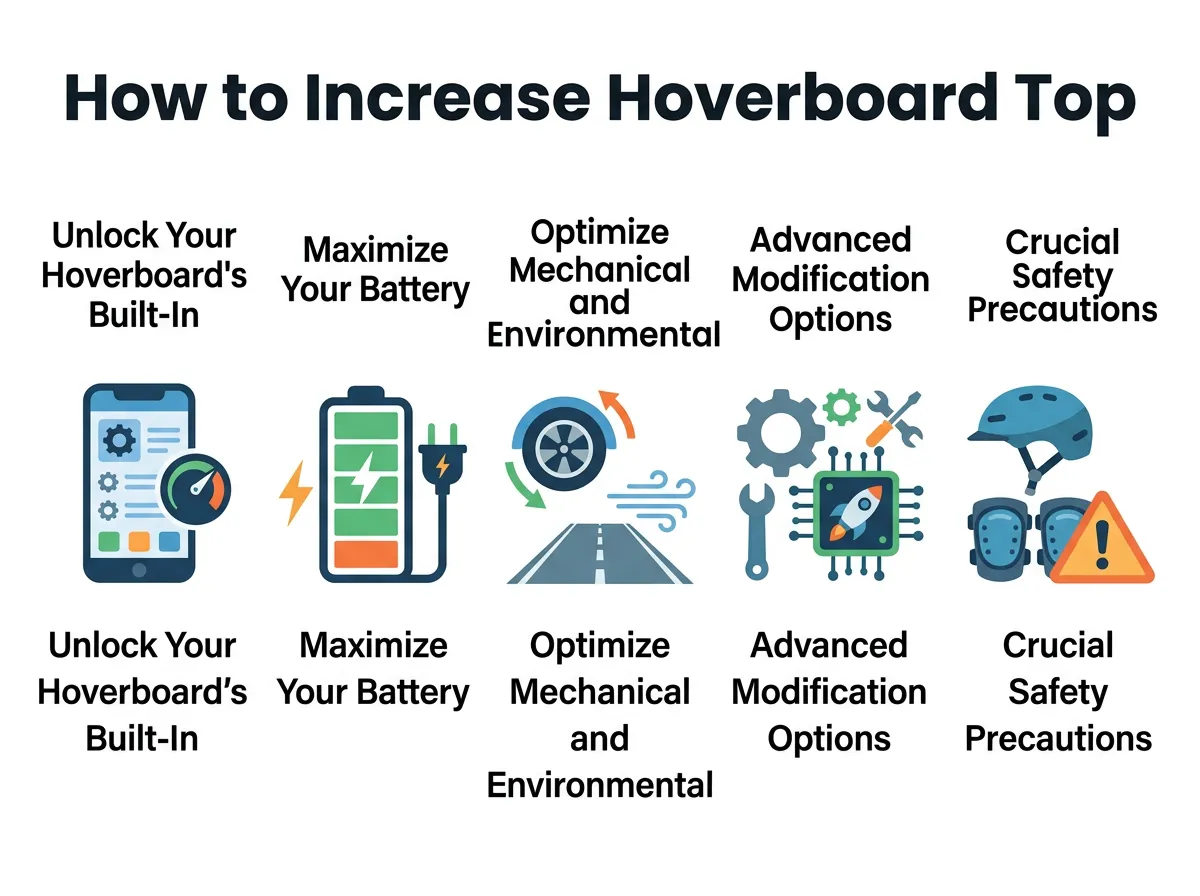
How to Increase Hoverboard Top Speed? — key points at a glance
Upgrade to a High-Quality Battery Pack
Not all batteries are created equal. Cheap, generic batteries lose their voltage quickly under a heavy load. Upgrading to a premium, certified battery pack can sustain higher speeds for longer periods. Just make sure the voltage matches your hoverboard’s specifications to avoid frying the internal circuit board. A high-quality battery pack not only improves speed but also extends the overall lifespan of your hoverboard, making it a highly recommended upgrade for serious riders.
Optimize Mechanical and Environmental Conditions
Maintain Perfect Tire Pressure
If your hoverboard has pneumatic (air-filled) tires, check the pressure regularly. Low tire pressure creates a larger contact patch with the ground, which increases rolling resistance and slows you down. Inflate the tires to the manufacturer’s recommended PSI to reduce friction and gain extra speed. If your board has solid rubber tires, keep them clean and free of debris, as dirty tires can slip and lose power transfer efficiency.
Reduce Carried Weight
When looking at how to increase hoverboard top speed, weight management is often overlooked. The electric motor has to work harder for every extra pound it carries. While you cannot safely change your own body weight instantly, you can reduce what you carry. Ditch the heavy backpack, wear lighter shoes, and travel light. The less weight the motors have to push, the faster they can spin. Even a small weight reduction of five pounds can make a noticeable difference in how quickly your hoverboard accelerates and reaches its top speed.
Choose the Right Terrain
Rough asphalt, grass, and dirt patches absorb energy and slow your board down. For the fastest possible ride, stick to smooth, clean, flat concrete. Riding on smooth surfaces minimizes motor strain and allows your wheels to glide effortlessly. This concept is very similar to how skateboarders optimize their setups, as explained in this electric skateboard speed boost guide which highlights the impact of surface friction and wheel quality on overall velocity. Stick to indoor arenas, smooth park pathways, or freshly paved roads for the best results.
Advanced Modification Options (For Tech-Savvy Riders)
Firmware Hacking and Shunts
If you have a background in electronics, you might want to explore custom firmware. Some enthusiasts modify the open-source software running on the main control board to bypass the factory speed limits. This is often referred to as “firmware hacking.” For instance, developers often discuss technical workarounds and controller tuning in community spaces, such as this hoverboard firmware hack FOC discussion on GitHub. Be warned that this requires soldering skills and a solid understanding of coding.
The Risks of Overclocking
We must emphasize that hardware hacks can be highly dangerous. Bypassing safety limits can lead to motor burnout, battery fires, or sudden shutdown while you are riding. If the board shuts down unexpectedly at high speeds, you will likely fall forward and sustain injuries. Proceed with extreme caution and only if you accept these risks. For most casual riders, it is much safer to rely on software settings and physical maintenance to get the speed boost they want.
Crucial Safety Precautions at High Speeds
Wear Proper Safety Gear
Going faster means falling harder. Always wear a high-quality helmet, wrist guards, elbow pads, and knee pads. A simple fall at 12 miles per hour can cause serious injury without protection. Do not skip the safety gear just because you feel confident in your riding skills. Unexpected bumps or sudden motor cutoffs can happen to even the most experienced riders, and protective gear can save you from a trip to the hospital.
Know Your Board’s Physical Limits
Every motor has a physical limit based on its wattage. Pushing a 250-watt motor past its design limits will eventually cause it to fail. Listen to your board. If it starts shaking, making strange whining noises, or getting excessively hot near the wheels, slow down immediately. These are clear signs that you are overworking the system. It is always better to enjoy a slightly slower ride than to ruin your expensive hoverboard or cause an accident.
Conclusion
Final Thoughts on Board Velocity
Learning how to increase hoverboard top speed is a natural step in any rider’s journey. By adjusting your app settings, maintaining a full charge, optimizing tire pressure, and riding on smooth surfaces, you can easily squeeze out extra performance without risking your safety or voiding your warranty. These simple, everyday tips ensure that your hoverboard runs as efficiently as possible, giving you the fastest possible ride within safe parameters.
Remember, speed is fun, but safety should always come first. Wear your protective gear, respect your board’s physical limits, and avoid dangerous modifications unless you are highly experienced. Enjoy the wind in your face, ride responsibly, and keep your gear in top shape for the best possible experience on the pavement!
Frequently Asked Questions
Can all hoverboards go faster through an app?
No, only hoverboards with Bluetooth connectivity and a dedicated companion app allow you to change speed modes. If your board does not have an app, you are limited to its default factory speed settings. You can still maximize its speed by keeping the battery fully charged and riding on smooth ground.
Will riding downhill increase my hoverboard’s top speed?
Riding downhill can increase your speed slightly due to gravity, but it can be highly dangerous. Most hoverboards have automatic braking systems that kick in to prevent you from going too fast and losing control. If you override this, you risk burning out the motor or crashing.
Does a heavier rider slow down a hoverboard?
Yes, weight directly impacts how hard the motors must work to move you forward. Heavier riders will experience slower acceleration and a slightly reduced top speed compared to lighter riders. To counteract this, minimize any extra gear or backpacks you carry while riding.
Can I upgrade the motors on my hoverboard?
While it is technically possible to install higher-wattage motors, it is highly impractical for most users. Upgrading the motors usually requires changing the motherboard, speed controllers, and battery pack to handle the extra power. For the cost and effort involved, it is usually better to buy a faster hoverboard model.
Is it safe to hack my hoverboard’s firmware for more speed?
No, hacking your firmware carries significant risks, including motor overheating and sudden system shutdowns. If the board shuts down while you are riding at high speed, you will likely experience a severe fall. Additionally, modifying the software instantly voids your manufacturer’s warranty.
Why does my hoverboard beep when I try to go faster?
The beeping sound is a safety warning indicating that you have reached the maximum safe speed limit of the board. If you continue to lean forward and push past this warning, the board may tilt back to force you to slow down or shut off entirely. Always respect the warning beeps to avoid falling.
