


If your hoverboard is beeping and slowing down, it is usually a safety warning. This happens when the battery is low, you are exceeding the speed limit, or the board is out of calibration. Charging your board, slowing down, or performing a quick system reset will usually solve the problem instantly.
Imagine you are gliding down the sidewalk on a sunny afternoon. The wind is in your hair, and you feel like you are flying. Suddenly, out of nowhere, your board starts to make a loud sound. It goes beep, beep, beep! At the same exact time, your speed drops. You lean forward, but the board refuses to go fast. It feels like it is dragging you down.
Are you wondering, why does my hoverboard beep and slow down? If so, you are not alone. This is one of the most common issues that new riders face. It can be very scary when your board starts to act up. You might worry that your expensive toy is broken forever. Fortunately, this is rarely the case.
In this guide, we will dive deep into why does my hoverboard beep and slow down. We will look at the safety features built into your board. We will also give you easy, step-by-step tips to fix the issue. You do not need to be a mechanic to get your ride back in perfect shape.
Key Takeaways
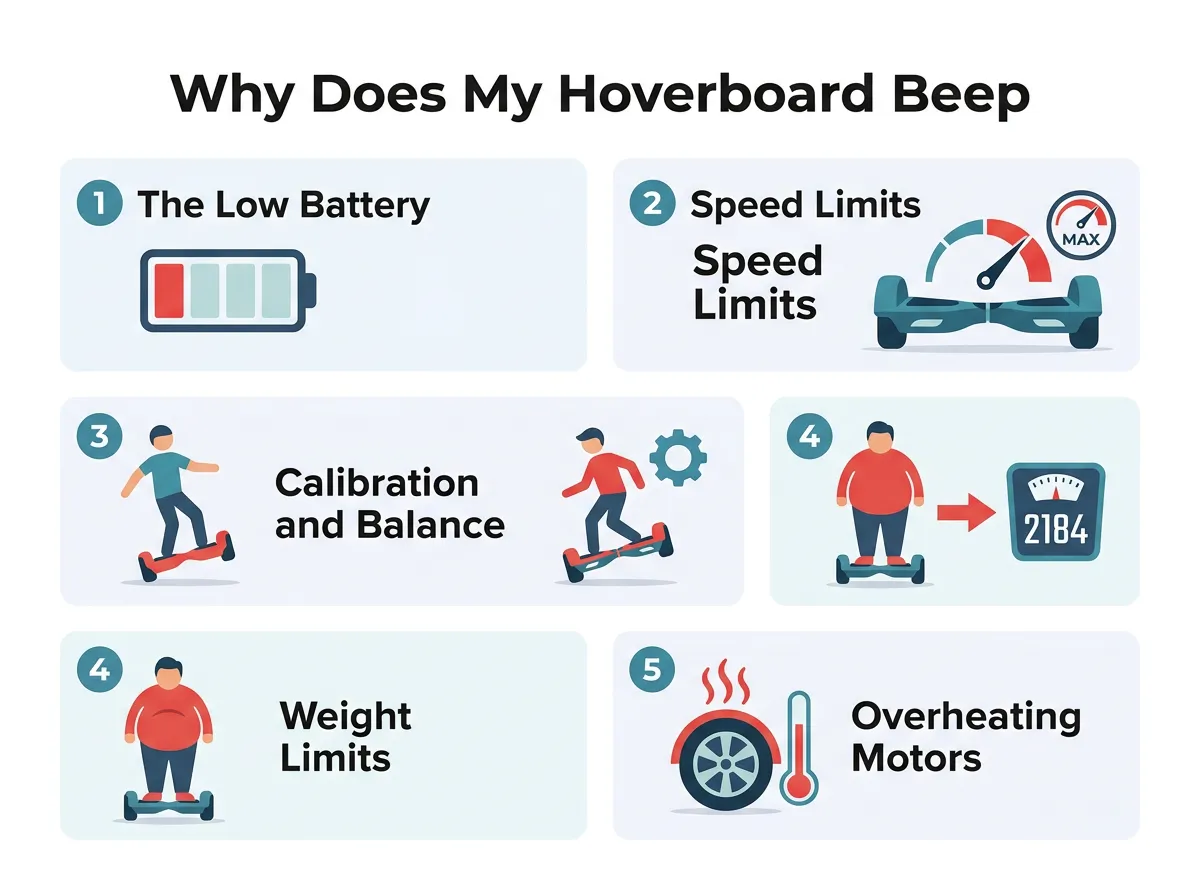
- Low Battery: The board slows down and beeps to prevent a sudden shutdown that could cause a fall.
- Over Speeding: Hoverboards have safety speed limits and will force you to slow down if you go too fast.
- Calibration Errors: Unbalanced gyroscopes confuse the system, requiring a simple manual reset.
- Weight Limits: Going under the minimum weight or over the maximum weight triggers safety alerts.
- Overheating: Hot motors or batteries will beep and slow down to prevent permanent damage.
📑 Table of Contents
1. The Low Battery Warning
When you ask why does my hoverboard beep and slow down, the battery is always the prime suspect. Your hoverboard runs on a lithium-ion battery. This battery pack sends power to the wheels and the brain of the board. When the battery gets low, it cannot supply enough energy to keep you balanced.
How the Battery Alert Protects You
If your hoverboard ran out of power and shut off instantly, you would fly off the front. This would lead to a very bad fall. To prevent this, the board has a safety trigger. This is why does my hoverboard beep and slow down when the charge gets low. It gives you a clear warning so you can step off safely before the motor shuts down completely.
Recognizing the Battery Light
Most hoverboards have a small battery icon on the top shell. When your battery is full, this light is green. When the charge drops below 20 percent, the light will turn orange or red. Shortly after, the beeping starts. If you hear the beep and see a red light, it is time to head home and plug in.
Tips for Battery Care
To keep your battery healthy, never leave it on the charger overnight. This can cause the battery to degrade over time. Always use the charger that came in the box. Third-party chargers can run too hot. If your board is old and will not hold a charge, you may need to buy a replacement battery pack.
2. Speed Limits and Pushback
Hoverboards are fast, but they are not racing cars. Most standard models have a top speed of 6 to 10 miles per hour. When you push past these limits, the board will take action. This explains why does my hoverboard beep and slow down when you try to race your friends.
Why Does My Hoverboard Beep and Slow Down? — key points at a glance
The Science of Pushback
When you go too fast, the electric motors cannot keep up with your lean. If you keep leaning forward, the board will slip out from under you. To stop this, the board uses a feature called pushback. The front edge of the footpads will tilt upward. This forces you to lean back. At the same time, the board will beep rapidly.
How to Handle Speed Alerts
To stop this, understand that why does my hoverboard beep and slow down is simply a safety speed limit. All you need to do is ease up. Lean back slightly and slow your pace. Once you return to a safe speed, the annoying sound will stop. If you want to ride faster, look into high-performance boards designed for speed.
3. Calibration and Balance Issues
Sometimes, your board gets confused about what flat ground actually is. This is a balance issue known as calibration. If you have ever asked why does my hoverboard beep and slow down on flat ground, calibration is likely the issue.
When Gyroscopes Lose Their Way
Inside your hoverboard are tiny sensors called gyroscopes. They detect how your feet tilt. If you ride over deep cracks, drop your board, or step on it unevenly, these sensors can get confused. The board thinks you are tilting wildly when you are actually standing straight. This triggers a panic mode in the system, causing it to beep and slow down.
How to Calibrate Your Hoverboard in 5 Steps
You can fix this balance issue in less than two minutes. You do not need any special tools. Just follow these simple steps:
- Step 1: Turn off your hoverboard completely.
- Step 2: Place the board on a flat, level floor. Make sure both footpads are perfectly aligned with each other.
- Step 3: Press and hold the power button down for about 10 seconds. Do not let go!
- Step 4: The lights on your board will start to flash, and you will hear a beep. Keep holding until the lights stop blinking.
- Step 5: Release the button, turn the board off, and then turn it back on. Your board is now reset!
4. Weight Limits and System Overload
Weight limits are another factor in why does my hoverboard beep and slow down. Every hoverboard has strict rules about who can ride it. These rules protect the motors and the frame.
Minimum Weight Limits
Many people do not know that hoverboards have a minimum weight limit. This is usually around 45 pounds. If a small child tries to ride, their weight will not press the sensors down all the way. The board will think someone is falling off. It will shake violently, beep, and slow to a stop.
Maximum Weight Limits
On the other hand, exceeding the maximum weight limit (usually 220 pounds) puts too much stress on the motors. The system will struggle to keep you balanced. To protect the internal gears from snapping, the board will slow down and beep to tell you to step off.
5. Overheating Motors and Batteries
Hoverboards are packed with electronic parts. Just like a smartphone, these parts can get very hot. Overheating explains why does my hoverboard beep and slow down after long use.
Friction on Tough Terrain
If you ride on thick grass, gravel, or up steep hills, your motors have to work twice as hard. This hard work generates a lot of heat inside the wheel hubs. On a hot summer day, this heat can build up very fast.
The Cooling Off Period
This protective shutdown is another reason why does my hoverboard beep and slow down during summer rides. The internal computer chip detects the high heat. To prevent a fire or melted wires, it cuts power to the motors. If your board feels hot to the touch, turn it off. Carry it to a cool, shady spot and let it rest for 30 minutes.
6. How to Troubleshoot Your Hoverboard
If you want to solve why does my hoverboard beep and slow down once and for all, use this handy checklist next time it happens:
- Check the lights: Is the battery light solid green, flashing green, or red?
- Assess the ground: Are you on a steep hill or a rough surface? Try moving to smooth asphalt.
- Check your speed: Were you rushing? Try riding at a slower, steadier pace.
- Reset the system: Perform a full calibration using the 5-step guide above.
- Inspect the wheels: Make sure there is no hair, dirt, or string wrapped around the wheel axles.
Conclusion
So, why does my hoverboard beep and slow down? It is all about safety. Your hoverboard is not trying to ruin your fun. It is actually trying to keep you safe and protect its own internal parts. Whether the issue is a dying battery, a fast ride, or a simple need for calibration, these alerts are your board’s way of talking to you.
The next time you ask why does my hoverboard beep and slow down, you will know exactly what to do. Listen to your board, respect its limits, and keep it calibrated. By following these easy tips, you will enjoy many safe, smooth rides for a long time to come. Keep your helmet on, stay safe, and enjoy the ride!
Frequently Asked Questions
Why does my hoverboard beep when I go fast?
This is a safety feature called over-speed protection. The hoverboard beeps and tilts back to force you to slow down so you do not lose your balance and fall. Simply lean back slightly to reduce your speed, and the beeping will stop.
Can a low battery make my hoverboard beep?
Yes, a low battery is the most common cause of beeping and slowing down. When the power drops below 20 percent, the board alerts you so you can step off safely before it shuts down completely. Plug it into the charger to resolve the issue.
How do I stop my hoverboard from beeping on flat ground?
If your board is beeping on flat ground, it likely needs to be calibrated. Turn the board off, place it on a level surface, and hold the power button for 10 seconds until the lights flash. Turn it off and back on to reset the balance sensors.
Why does my hoverboard shake and beep when I stand on it?
Shaking and beeping usually happen if you do not meet the minimum weight limit or if your feet are placed too close to the center. Make sure you weigh at least 45 pounds and place your feet wide, directly over the sensor pads near the wheels.
Can riding on grass cause my hoverboard to beep and slow down?
Yes, riding on thick grass creates a lot of friction and makes the motors work extra hard. This can cause the motors to overheat or overload, triggering a safety warning beep and slowdown. Try to stick to smooth, paved surfaces instead.
How long should I let my hoverboard cool down if it overheats?
If your hoverboard is hot and beeping due to overheating, you should turn it off immediately. Place it in a cool, dry, and shady spot for at least 30 minutes. Let the motors and battery cool down completely before you attempt to ride it again.does my hoverboard beep and slow down?wing down, it is usually a safety warning. This happens when the battery is low, you are exceeding the speed limit, or the board is out of calibration. Charging your board, slowing down, or performing a quick system reset will usually solve the problem instantly.
Imagine you are gliding down the sidewalk on a sunny afternoon. The wind is in your hair, and you feel like you are flying. Suddenly, out of nowhere, your board starts to make a loud sound. It goes beep, beep, beep! At the same exact time, your speed drops. You lean forward, but the board refuses to go fast. It feels like it is dragging you down.
Are you wondering, why does my hoverboard beep and slow down? If so, you are not alone. This is one of the most common issues that new riders face. It can be very scary when your board starts to act up. You might worry that your expensive toy is broken forever. Fortunately, this is rarely the case.
In this guide, we will dive deep into why does my hoverboard beep and slow down. We will look at the safety features built into your board. We will also give you easy, step-by-step tips to fix the issue. You do not need to be a mechanic to get your ride back in perfect shape.
Key Takeaways
- Low Battery: The board slows down and beeps to prevent a sudden shutdown that could cause a fall.
- Over Speeding: Hoverboards have safety speed limits and will force you to slow down if you go too fast.
- Calibration Errors: Unbalanced gyroscopes confuse the system, requiring a simple manual reset.
- Weight Limits: Going under the minimum weight or over the maximum weight triggers safety alerts.
- Overheating: Hot motors or batteries will beep and slow down to prevent permanent damage.
📑 Table of Contents
1. The Low Battery Warning
When you ask why does my hoverboard beep and slow down, the battery is always the prime suspect. Your hoverboard runs on a lithium-ion battery. This battery pack sends power to the wheels and the brain of the board. When the battery gets low, it cannot supply enough energy to keep you balanced.
How the Battery Alert Protects You
If your hoverboard ran out of power and shut off instantly, you would fly off the front. This would lead to a very bad fall. To prevent this, the board has a safety trigger. This is why does my hoverboard beep and slow down when the charge gets low. It gives you a clear warning so you can step off safely before the motor shuts down completely.
Recognizing the Battery Light
Most hoverboards have a small battery icon on the top shell. When your battery is full, this light is green. When the charge drops below 20 percent, the light will turn orange or red. Shortly after, the beeping starts. If you hear the beep and see a red light, it is time to head home and plug in.
Tips for Battery Care
To keep your battery healthy, never leave it on the charger overnight. This can cause the battery to degrade over time. Always use the charger that came in the box. Third-party chargers can run too hot. If your board is old and will not hold a charge, you may need to buy a replacement battery pack.
2. Speed Limits and Pushback
Hoverboards are fast, but they are not racing cars. Most standard models have a top speed of 6 to 10 miles per hour. When you push past these limits, the board will take action. This explains why does my hoverboard beep and slow down when you try to race your friends.
Why Does My Hoverboard Beep and Slow Down? — key points at a glance
The Science of Pushback
When you go too fast, the electric motors cannot keep up with your lean. If you keep leaning forward, the board will slip out from under you. To stop this, the board uses a feature called pushback. The front edge of the footpads will tilt upward. This forces you to lean back. At the same time, the board will beep rapidly.
How to Handle Speed Alerts
To stop this, understand that why does my hoverboard beep and slow down is simply a safety speed limit. All you need to do is ease up. Lean back slightly and slow your pace. Once you return to a safe speed, the annoying sound will stop. If you want to ride faster, look into high-performance boards designed for speed.
3. Calibration and Balance Issues
Sometimes, your board gets confused about what flat ground actually is. This is a balance issue known as calibration. If you have ever asked why does my hoverboard beep and slow down on flat ground, calibration is likely the issue.
When Gyroscopes Lose Their Way
Inside your hoverboard are tiny sensors called gyroscopes. They detect how your feet tilt. If you ride over deep cracks, drop your board, or step on it unevenly, these sensors can get confused. The board thinks you are tilting wildly when you are actually standing straight. This triggers a panic mode in the system, causing it to beep and slow down.
How to Calibrate Your Hoverboard in 5 Steps
You can fix this balance issue in less than two minutes. You do not need any special tools. Just follow these simple steps:
- Step 1: Turn off your hoverboard completely.
- Step 2: Place the board on a flat, level floor. Make sure both footpads are perfectly aligned with each other.
- Step 3: Press and hold the power button down for about 10 seconds. Do not let go!
- Step 4: The lights on your board will start to flash, and you will hear a beep. Keep holding until the lights stop blinking.
- Step 5: Release the button, turn the board off, and then turn it back on. Your board is now reset!
4. Weight Limits and System Overload
Weight limits are another factor in why does my hoverboard beep and slow down. Every hoverboard has strict rules about who can ride it. These rules protect the motors and the frame.
Minimum Weight Limits
Many people do not know that hoverboards have a minimum weight limit. This is usually around 45 pounds. If a small child tries to ride, their weight will not press the sensors down all the way. The board will think someone is falling off. It will shake violently, beep, and slow to a stop.
Maximum Weight Limits
On the other hand, exceeding the maximum weight limit (usually 220 pounds) puts too much stress on the motors. The system will struggle to keep you balanced. To protect the internal gears from snapping, the board will slow down and beep to tell you to step off.
5. Overheating Motors and Batteries
Hoverboards are packed with electronic parts. Just like a smartphone, these parts can get very hot. Overheating explains why does my hoverboard beep and slow down after long use.
Friction on Tough Terrain
If you ride on thick grass, gravel, or up steep hills, your motors have to work twice as hard. This hard work generates a lot of heat inside the wheel hubs. On a hot summer day, this heat can build up very fast.
The Cooling Off Period
This protective shutdown is another reason why does my hoverboard beep and slow down during summer rides. The internal computer chip detects the high heat. To prevent a fire or melted wires, it cuts power to the motors. If your board feels hot to the touch, turn it off. Carry it to a cool, shady spot and let it rest for 30 minutes.
6. How to Troubleshoot Your Hoverboard
If you want to solve why does my hoverboard beep and slow down once and for all, use this handy checklist next time it happens:
- Check the lights: Is the battery light solid green, flashing green, or red?
- Assess the ground: Are you on a steep hill or a rough surface? Try moving to smooth asphalt.
- Check your speed: Were you rushing? Try riding at a slower, steadier pace.
- Reset the system: Perform a full calibration using the 5-step guide above.
- Inspect the wheels: Make sure there is no hair, dirt, or string wrapped around the wheel axles.
Conclusion
So, why does my hoverboard beep and slow down? It is all about safety. Your hoverboard is not trying to ruin your fun. It is actually trying to keep you safe and protect its own internal parts. Whether the issue is a dying battery, a fast ride, or a simple need for calibration, these alerts are your board’s way of talking to you.
The next time you ask why does my hoverboard beep and slow down, you will know exactly what to do. Listen to your board, respect its limits, and keep it calibrated. By following these easy tips, you will enjoy many safe, smooth rides for a long time to come. Keep your helmet on, stay safe, and enjoy the ride!
Frequently Asked Questions
Why does my hoverboard beep when I go fast?
This is a safety feature called over-speed protection. The hoverboard beeps and tilts back to force you to slow down so you do not lose your balance and fall. Simply lean back slightly to reduce your speed, and the beeping will stop.
Can a low battery make my hoverboard beep?
Yes, a low battery is the most common cause of beeping and slowing down. When the power drops below 20 percent, the board alerts you so you can step off safely before it shuts down completely. Plug it into the charger to resolve the issue.
How do I stop my hoverboard from beeping on flat ground?
If your board is beeping on flat ground, it likely needs to be calibrated. Turn the board off, place it on a level surface, and hold the power button for 10 seconds until the lights flash. Turn it off and back on to reset the balance sensors.
Why does my hoverboard shake and beep when I stand on it?
Shaking and beeping usually happen if you do not meet the minimum weight limit or if your feet are placed too close to the center. Make sure you weigh at least 45 pounds and place your feet wide, directly over the sensor pads near the wheels.
Can riding on grass cause my hoverboard to beep and slow down?
Yes, riding on thick grass creates a lot of friction and makes the motors work extra hard. This can cause the motors to overheat or overload, triggering a safety warning beep and slowdown. Try to stick to smooth, paved surfaces instead.
How long should I let my hoverboard cool down if it overheats?
If your hoverboard is hot and beeping due to overheating, you should turn it off immediately. Place it in a cool, dry, and shady spot for at least 30 minutes. Let the motors and battery cool down completely before you attempt to ride it again.
